
Hands-on review
RayNeo iO review: smart glasses for ¥80,000
My conclusion first: after using them, the RayNeo iO felt like an Even G2 that costs ¥10,000 less. Comparing their regular prices, the gap is only about ¥10,000.
First published:note · This article and photos are reprinted from note.
AI-assisted English translation of the author’s Japanese article. Product screenshots and embedded source material are reproduced in their original language. Read the Japanese original.
I'll write the conclusion first. If I had to describe my impression of using it in one word, RayNeo iO is an Even G2 for ¥10,000 less That's right. Compared to the regular prices, the difference is only about 10,000 yen.
If I answer the question in the title, at least in my usage, it didn't exceed the Even G2.
Another perspective came to mind while using it. The RayNeo iO islike a combination of the Even G2 and an AI voice recorder pendant. It looks that way, but of course, RayNeo isn't explicitly saying that, it's just my interpretation. If I look at it as smart glasses, I would recommend the Even G2. If I look at it as an extension of an AI pendant, the hardware is good, but the software still hasn't caught up.
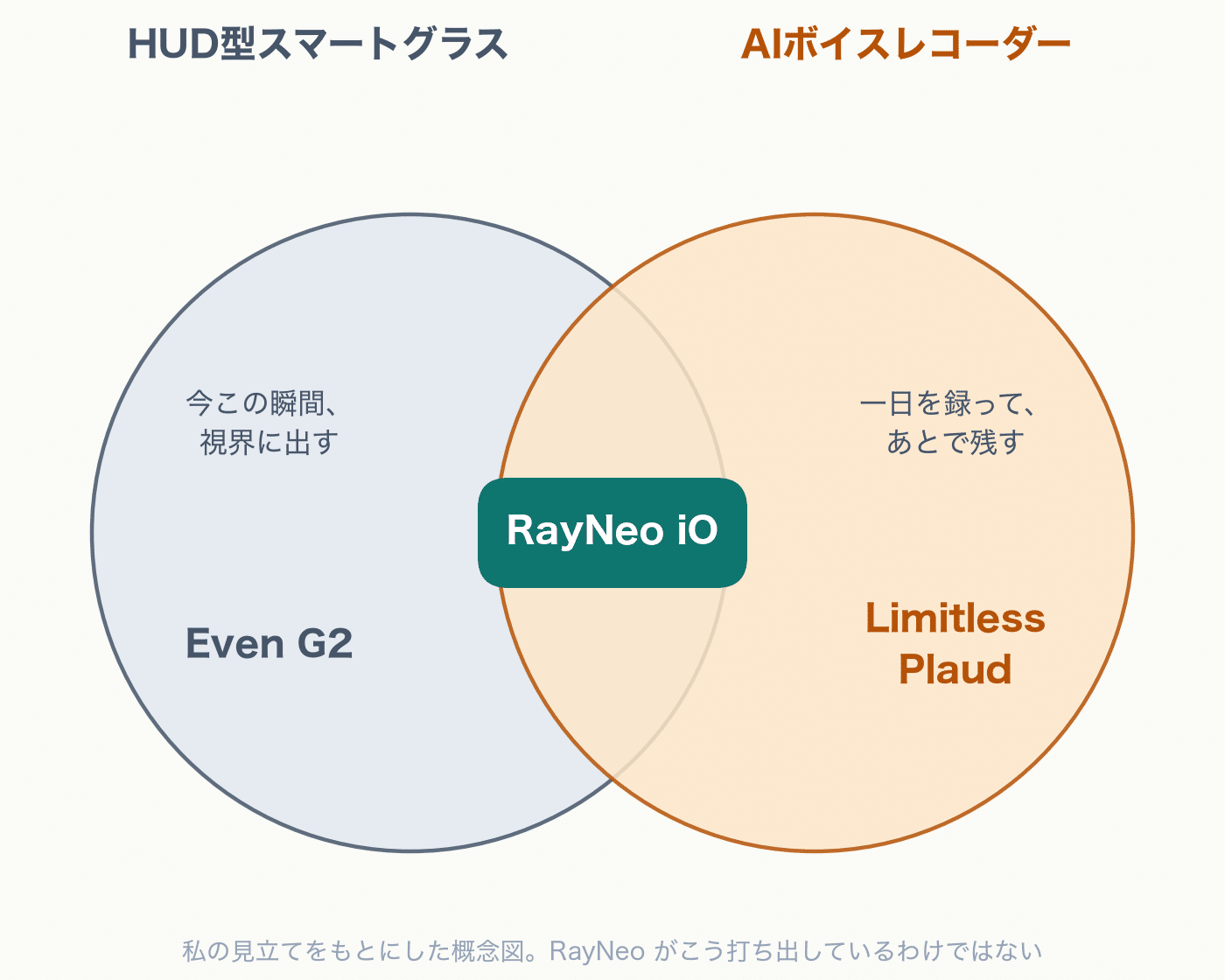
In this article, I'll look at these two aspects in order.
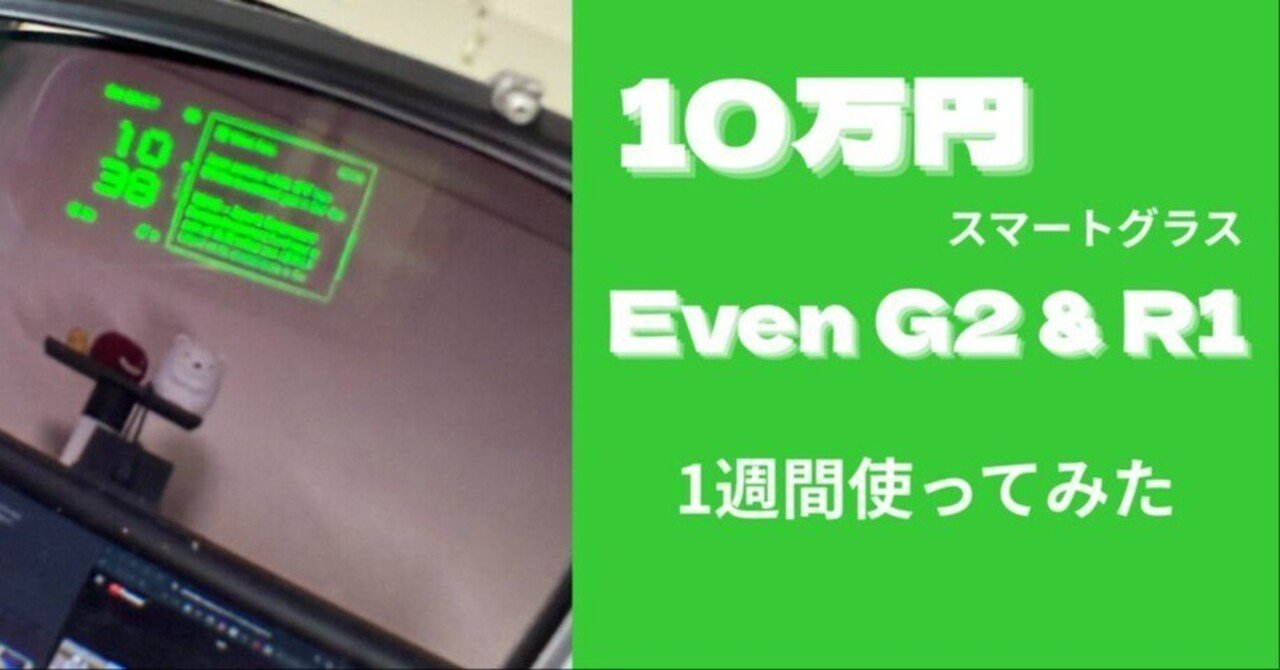
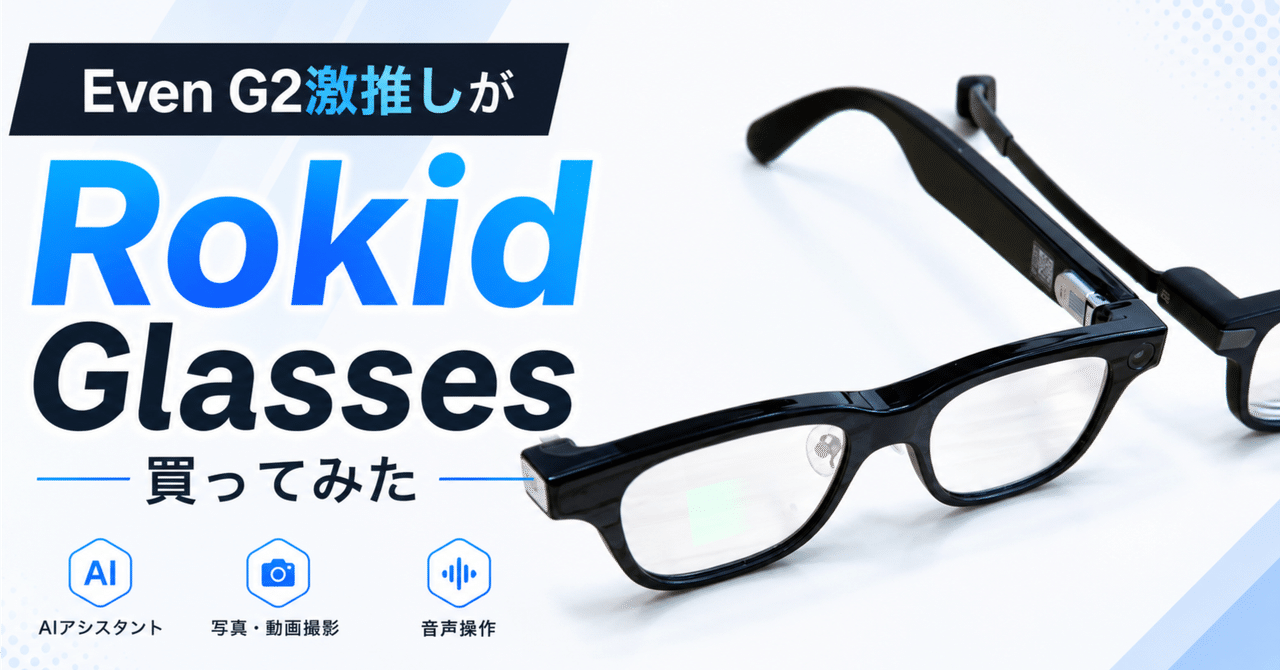
Let me note that this is not a versus article comparing it to the Even G2. I've been using the Even series since the G1, and I gave the G2 a score of 120. After that, I also tried the Rokid Glasses with a camera. Since my standard for smart glasses experience is the Even G2, I'll use that as a benchmark. In each section, I'll first look at the RayNeo iO itself, and then add a comparison to the standard Even G2.
What is RayNeo iO
If you already know, please skip ahead.
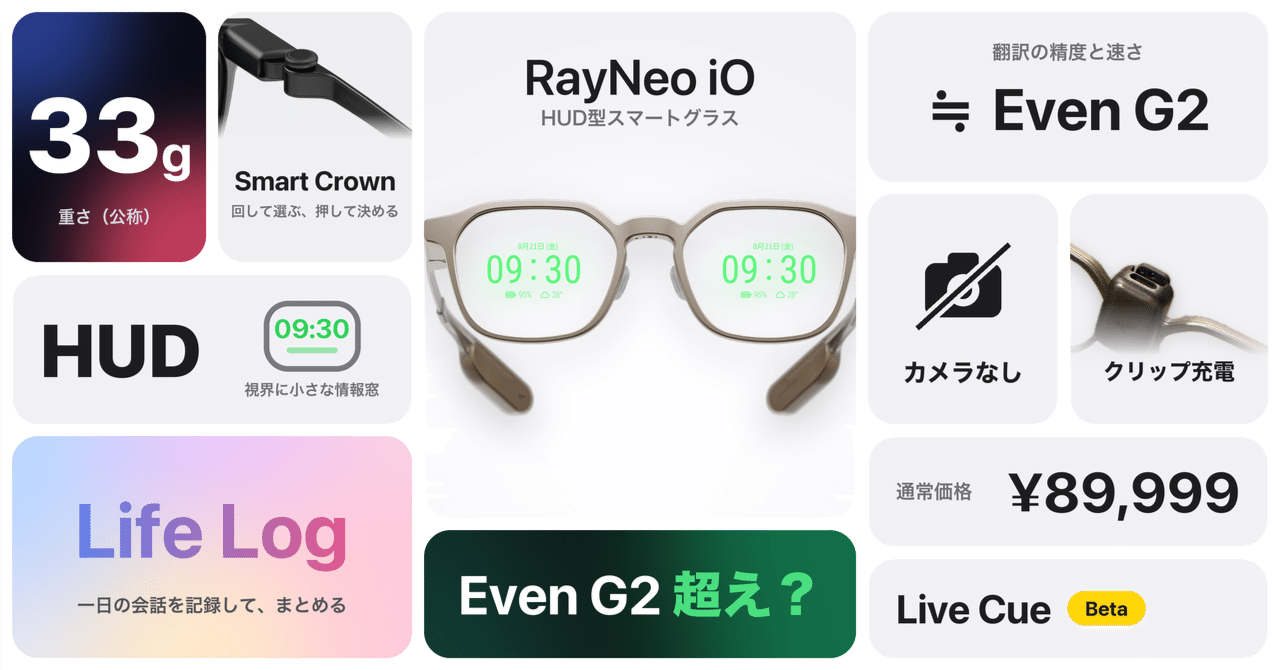
RayNeo iO The RayNeo iO is a smart glasses model with a display released by RayNeo.Reservations started in Japan on September 4, 2026。
-
Weight: approximately 33g
-
Display: MicroLED for both eyes + diffraction optical waveguide, monochrome green
-
Camera and speaker: not equipped
-
Microphone: 4-microphone array + bone conduction sensor
-
Operation: Smart Crown (attached to the temple), voice, and head gestures
-
Battery: approximately 48 hours standard, up to 6.2 hours for continuous translation
-
Dust and water resistance: IP54
-
Price: normally 89,999 yen, 80,000 yen for the launch commemoration (RayNeo official store)
Features include live subtitles (translation), live cues, life logging, voice memos, and teleprompters. The lineup is almost the same as the Even G2, with the only difference being the life log.
In terms of genre, it's a head-up display (HUD) type that floats a small information window in the field of view. It's in the same genre as the Even G2 and Rokid Glasses, and in my categorization, it falls under "glasses-type Apple Watch series". It's different from "glasses-type monitors" for watching videos on a large screen, so be careful when comparing.
Price: I'd be happy if it were around 60,000 yen
First, let's talk about the price. I think it's what buyers worry about the most, which is why I'm bringing it up.
The Even G2 is 99,800 yen. The regular price of the RayNeo iO is 89,999 yen, which is only about a 10,000 yen difference. Even when compared to the launch commemoration price of 80,000 yen, the difference is about 20,000 yen. I was able to buy it for 72,000 yen by applying a 10% discount code to the launch commemoration price, but I ended up buying it the day before for 80,000 yen.
For someone who is seriously considering buying smart glasses for over 100,000 yen, a difference of 10,000 yen may not be a deciding factor. If I were in the same position, I would choose the Even G2 even if it means paying an extra 10,000 yen.
New category products are inevitably expensive at first. Development and manufacturing costs are high, and parts and mass production are not yet established, so the current price is unavoidable to some extent. I'm not complaining about the price. From here on, please read this as a discussion from the perspective of a single user, thinking "it would be great if it were like this".
If it were around 60,000 yen, I think the position of this product would change dramatically. For someone with a budget of 60,000 yen, the upper limit that makes them think "maybe I'll try a bit harder" is probably around 1.5 times that, or 90,000 yen. At 90,000 yen, it still falls short of the 99,800 yen price of the Even G2. In other words, if it were 60,000 yen, it could be a compromise for people who think "Even G2 is out of reach, but I want smart glasses with a display". Even if it's compared to the Even G2, it would have a clear price advantage.
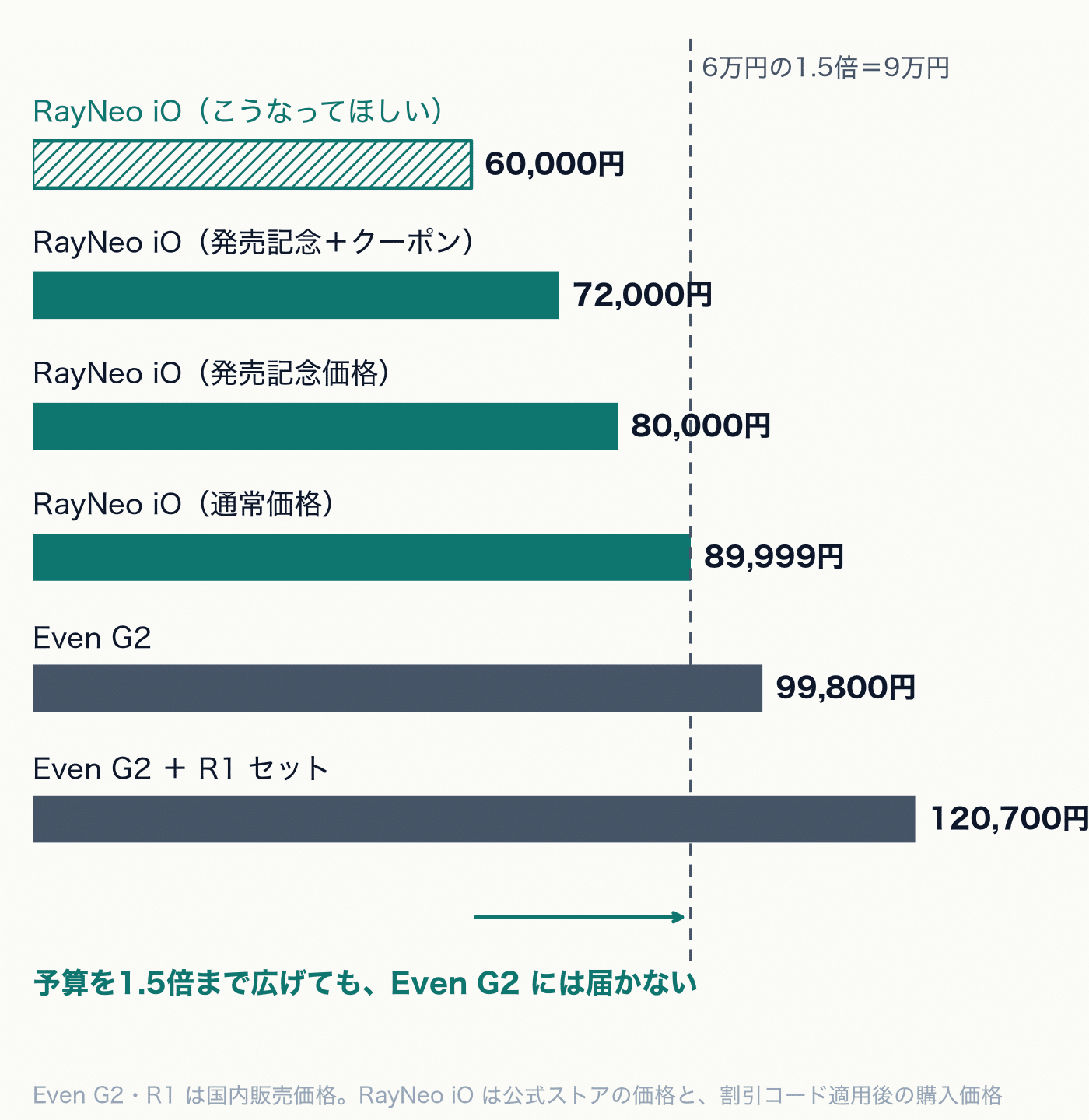
At the current price, it's inevitably easy to compare it to the Even G2. If a more affordable RayNeo iO were to come out someday, I think we'd see a different landscape.
By the way, the Even G2 has an R1. If you buy the R1 as a set, the price difference would be around 30,000 yen, even at the regular price. I think this is because the R1 experience itself has a price tag, which I'll write about later.
There are also costs that aren't visible in the base price. To use ChatGPT or other AI models with the RayNeo iO, you need a VIP subscription. On the official Japanese store, it's listed as $9.99 per month (RayNeo official store). The only ones you can use for free are RayNeo AI and Gemini.
The Even G2 is relatively flexible in this regard. You can create your own apps, and you can also replace the AI endpoint. If you're someone who can get their hands dirty, you can connect your preferred AI without paying an extra monthly fee.
Texture: The lightness makes it look cheap
The selling point of the RayNeo iO is its lightness. Weighing in at around 33g, it's lighter than the Even G2's 36g. The materials are also impressive, with a front made of magnesium-aluminum alloy and temples made of titanium alloy.
And yet, when I picked it up, I was slightly taken aback. It's so light that it feels like it's lacking in weight, and that lightness gives me a sense of cheapness. This is completely a matter of my personal perception. When I hold something that costs almost 90,000 yen, I unconsciously expect a certain level of weight and substance. To my hands, which are used to the Even G2, the iO's lightness felt untrustworthy.
However, this is just my initial impression when I took it out of the box. Once you put it on, the lightness is a pure advantage, and you stop noticing it as you start using it.
I'll also mention a couple of minor points.
The temples are made of titanium, but they don't have the same matte finish as the Even G2, so they can get a bit fingerprint-y. Since you touch the temples every time you operate the Smart Crown, you'll notice the fingerprints accumulating. It's not as bad as the Rokid Glasses' glossy black, though.
The front of the frames may look a bit cheap when you see it up close. I chose the gold (dune) color, so it might be due to the color. From a distance, it looks like normal glasses, and it doesn't look bad. If I had chosen the dark grey (polar night) color, my impression might be different.
Wearing feel: The tip of the temple is big
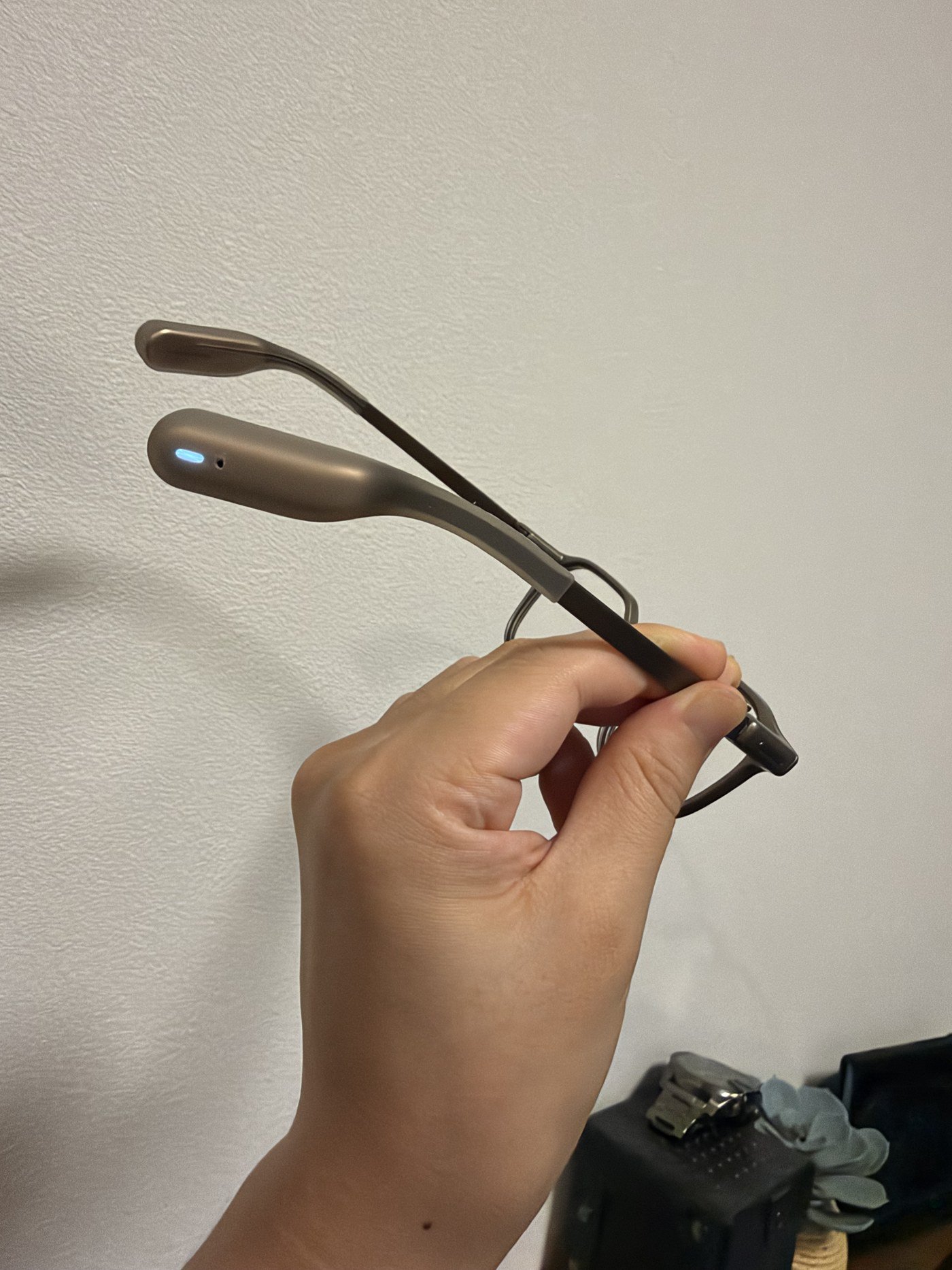
The bulge that comes behind the ear in the photo is the tip of the temple. The glowing part is the LED that indicates recording, which I will write about later.
The tip of the temple is large. It's the part where the microphone and LED are housed, and it's noticeably thicker than regular glasses.
But my ears never hurt. Even if I wear them all day, there's no residual mark. I think it depends on the size of your face. The position of the tip of the temple varies from person to person, so it hits different parts of the ear.
The side pressure feels weaker than the Even G2. The Even G2 has a thin temple design that tightens and fixes, so you can feel a bit of pressure on your temples. The RayNeo iO is looser in that area. In terms of wearability, the iO is sometimes more comfortable.
Charging: The clip type is just right
The charging method is good.
From the G1 to the G2, the Even series has always used case charging. The case itself has a battery, and when you put the glasses away, they charge. That has its advantages. However, the Even G2 basically lasts a day with ease, so the case doesn't need a battery that large. Rather, the case becomes bulky because of it. Moreover, you can't charge without the case. However, since the Even G2's battery life is normal, it's not a problem even if you leave the case at home. You can even use it for 2 days in an emergency.
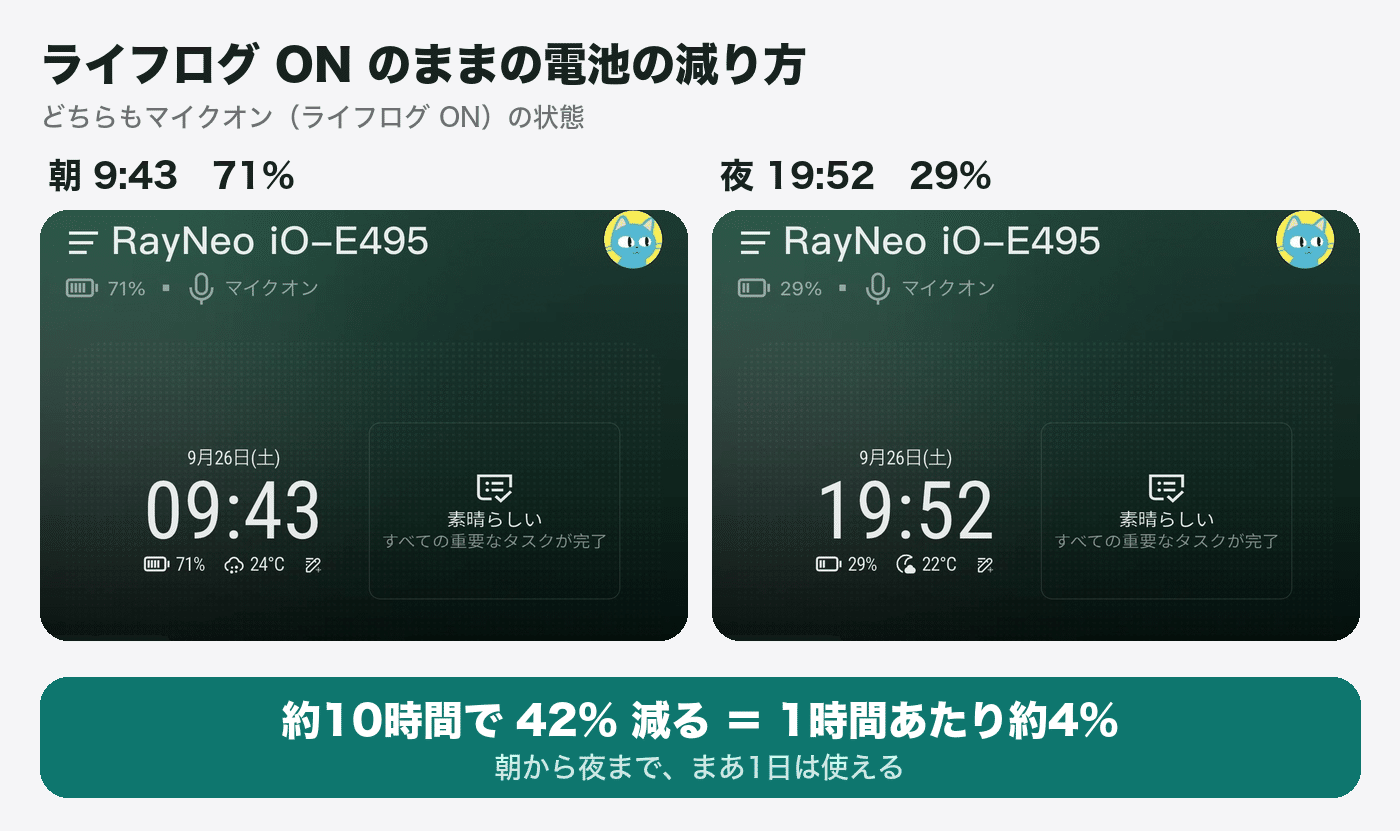
The RayNeo iO's battery decreases by about 4% per hour when the lifelog is turned on. It went from 71% at 9:43 AM to 29% at 7:52 PM, which is a decrease of 42% in about 10 hours. Well, it can be used for a day.
The RayNeo iO uses a clip-type charger that is attached to the end of a USB cable and inserted into the glasses. The clip is inserted into the bridge (between the left and right lenses). There is a USB-C port on top of the clip, so you can charge by inserting the cable there.
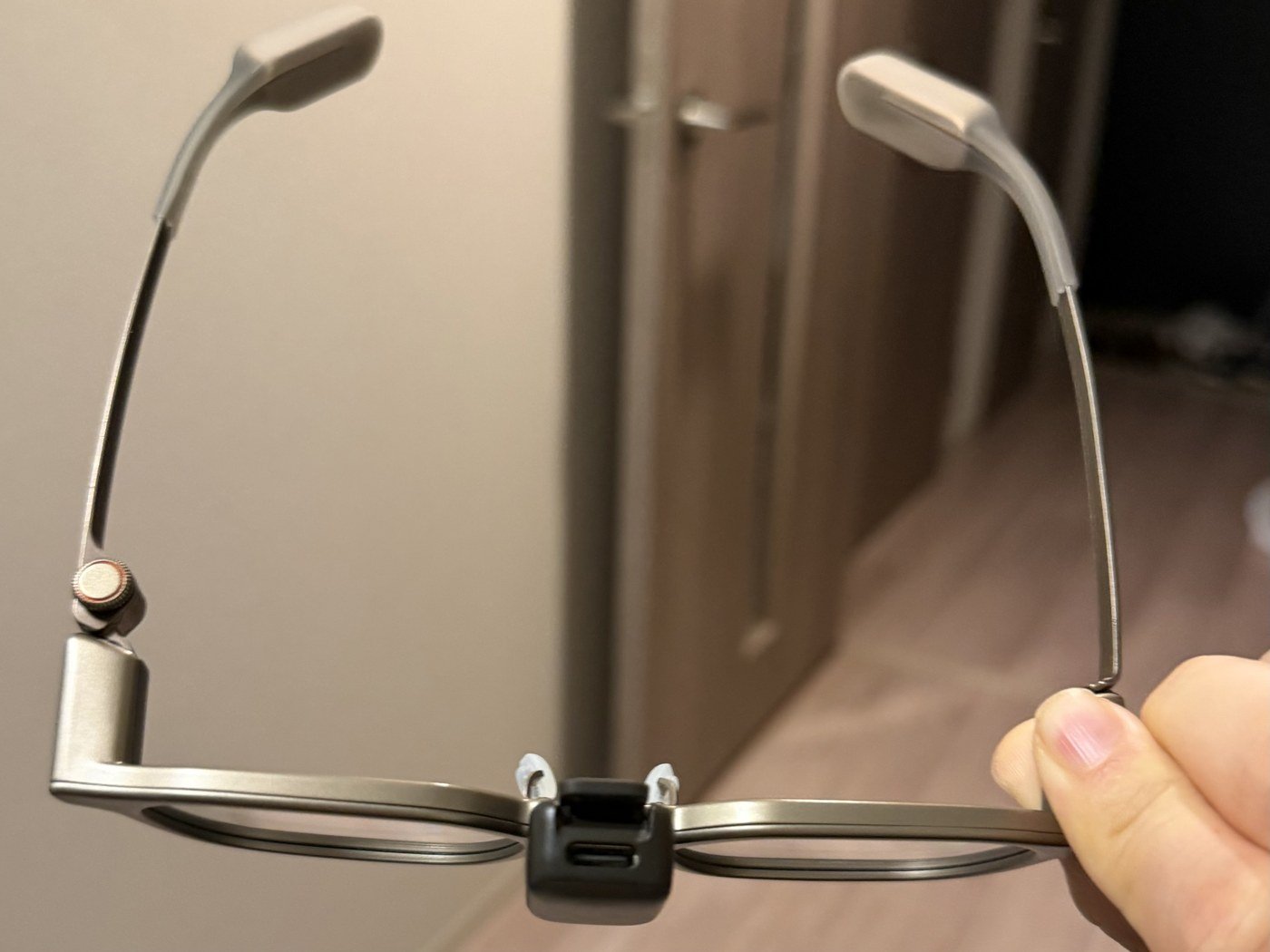
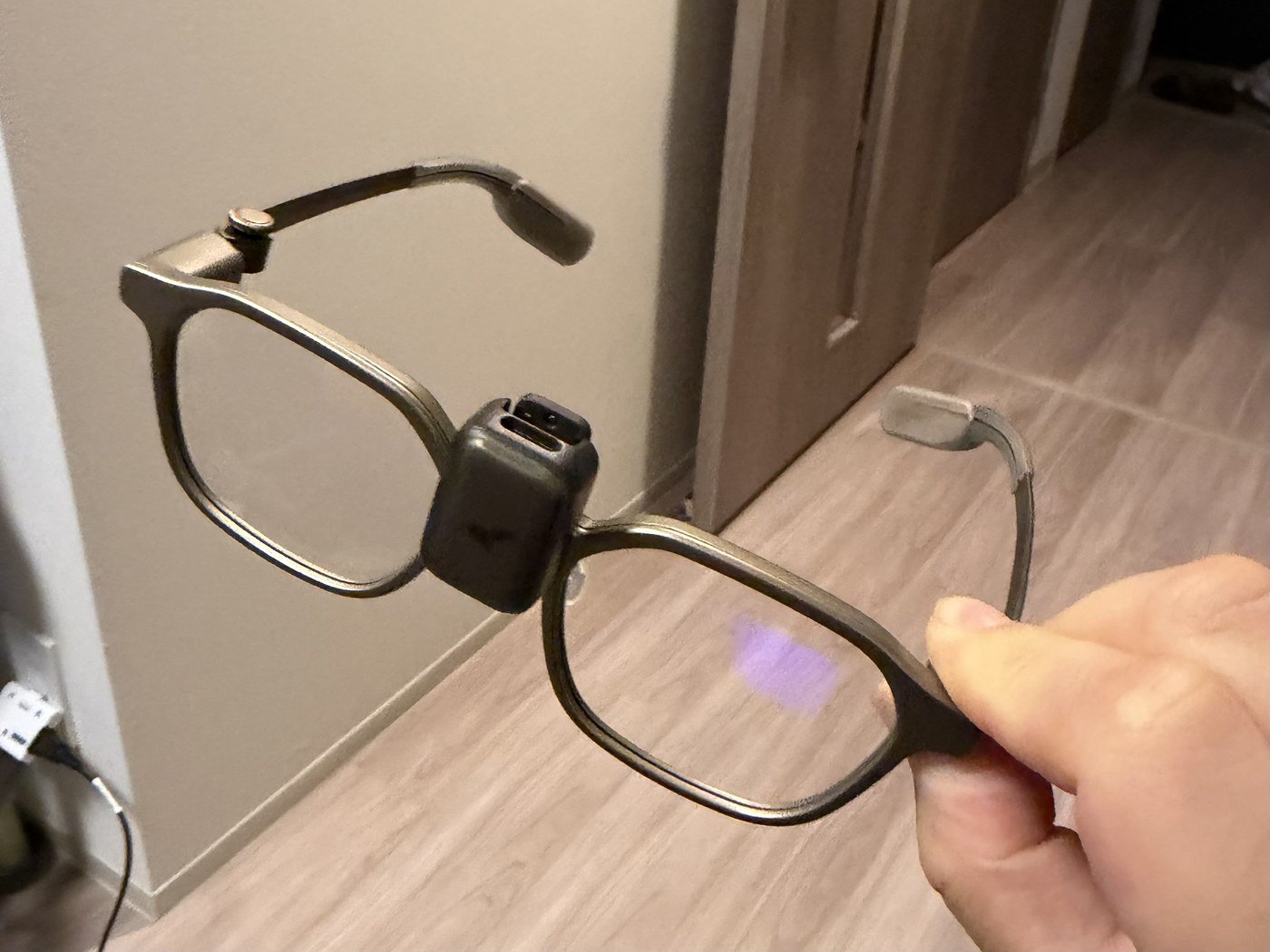
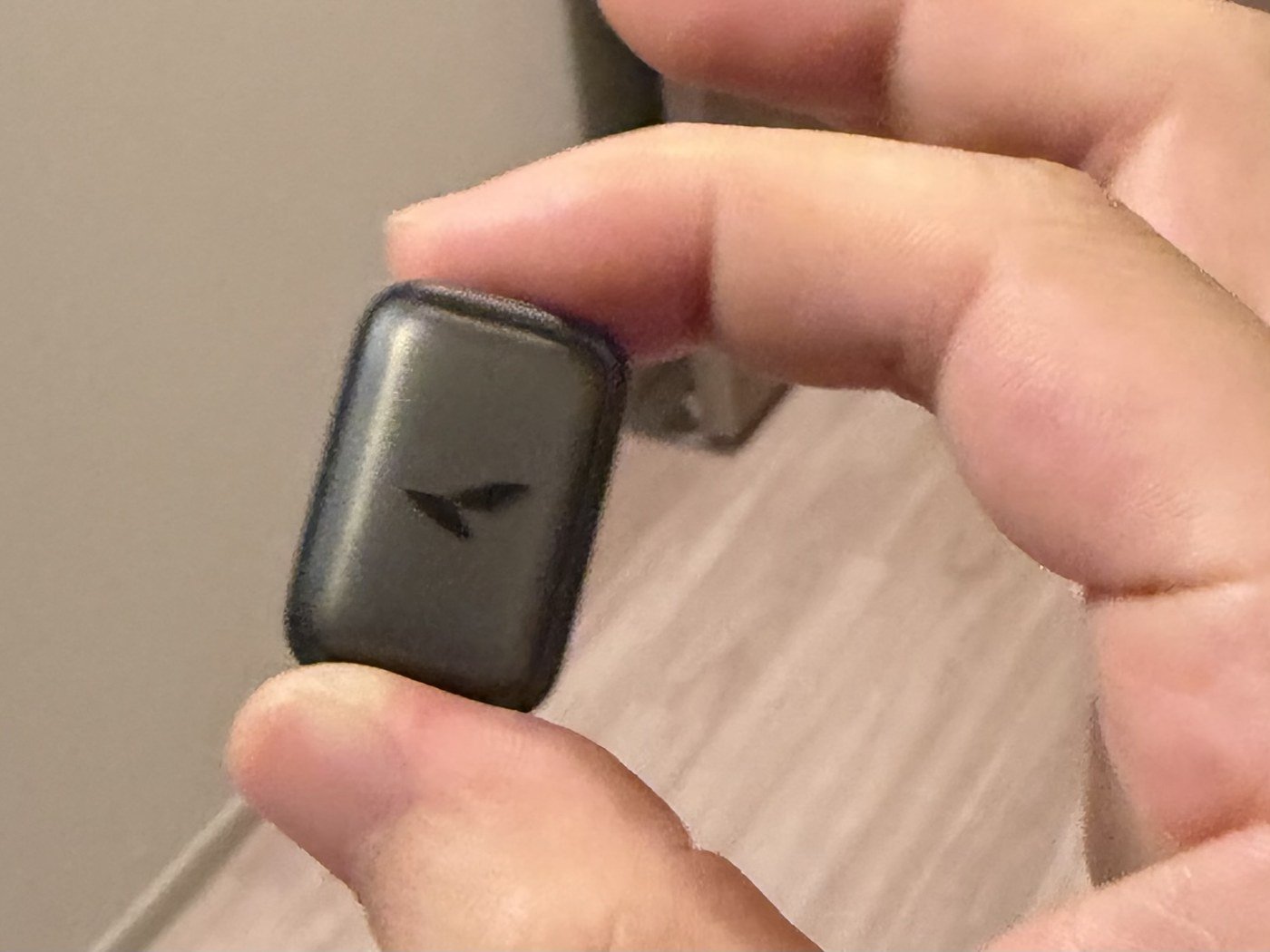
It's good that this clip type is the default. If you want a charging case, you can choose a set with a charging case (90,000 yen). You can decide whether to choose it or not. Even doesn't have that option to begin with.
The clip is about the size of a 500-yen coin, and it's not a hassle to carry around. I don't have any particular complaints.
The included case also has a good texture. It's a hard case, but it's not bulky. Since you don't need to carry the case around for charging, you can use it like a regular glasses case.
Smart Crown: something I really like
What I liked most about the RayNeo iO was the Smart Crown, which is attached to the temple.
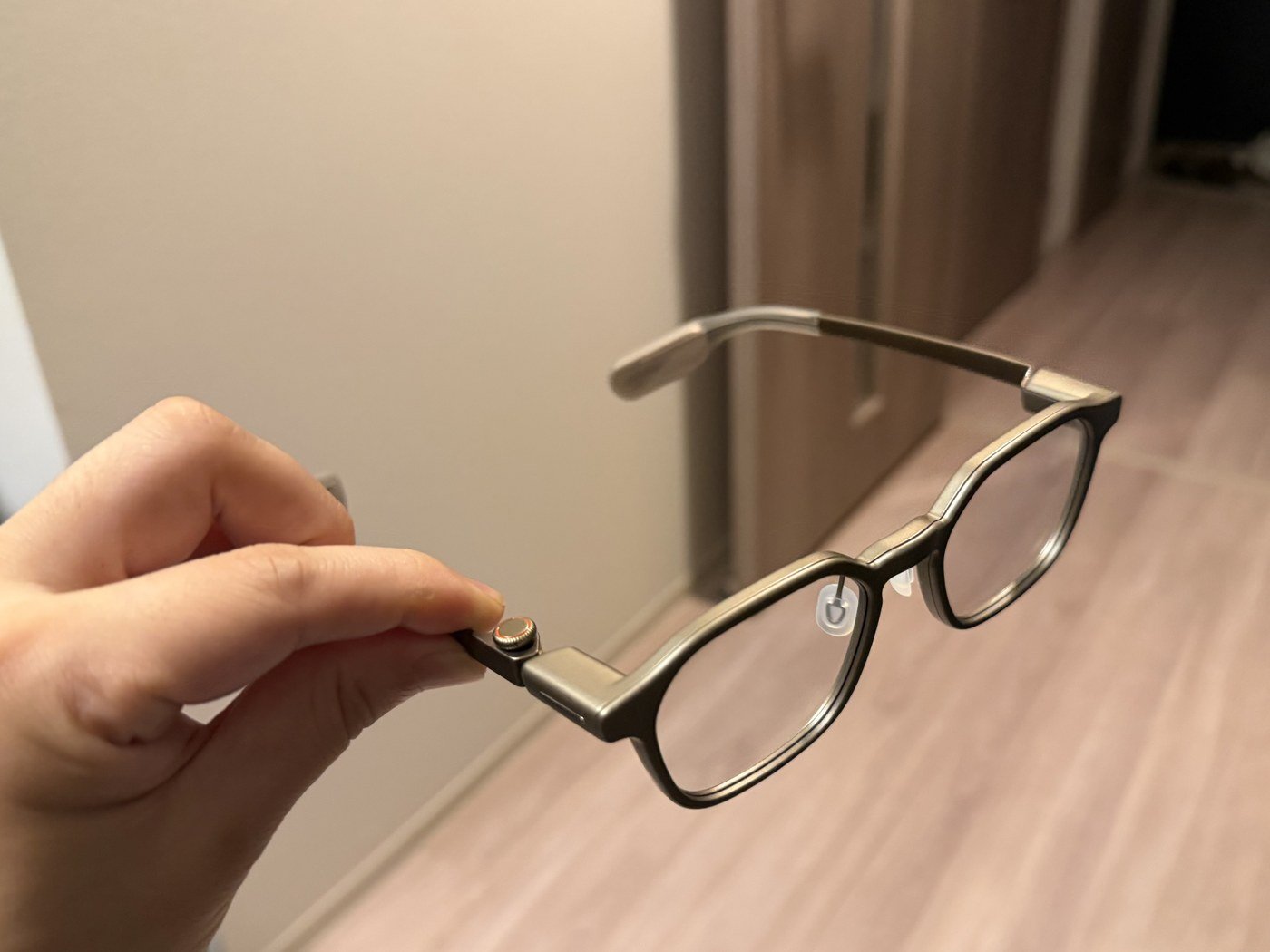
Rotate to select, press to decide. The operation is the same as the digital crown on the Apple Watch.
-
Double-clicking does not malfunction
-
Does not get hair tangled
-
The appearance is almost unnoticeable
Touch sensors often have issues like "I meant to touch it but it didn't respond" or "I didn't touch it but it responded". Physical dials don't have those issues. It moves exactly as much as you rotate it, and it's decided only when you press it. Being able to do obvious things obviously is a big deal for devices used daily.
The fact that it doesn't get hair tangled is probably also because I have short hair. I've been cutting my hair short for the touch sensor on the Even G1. Smart glasses otaku should cut their hair.
The design is also barely noticeable, to the point where you'd only notice the dial if you look closely. It's within the realm of design. Having a dial on glasses is actually kind of stylish.
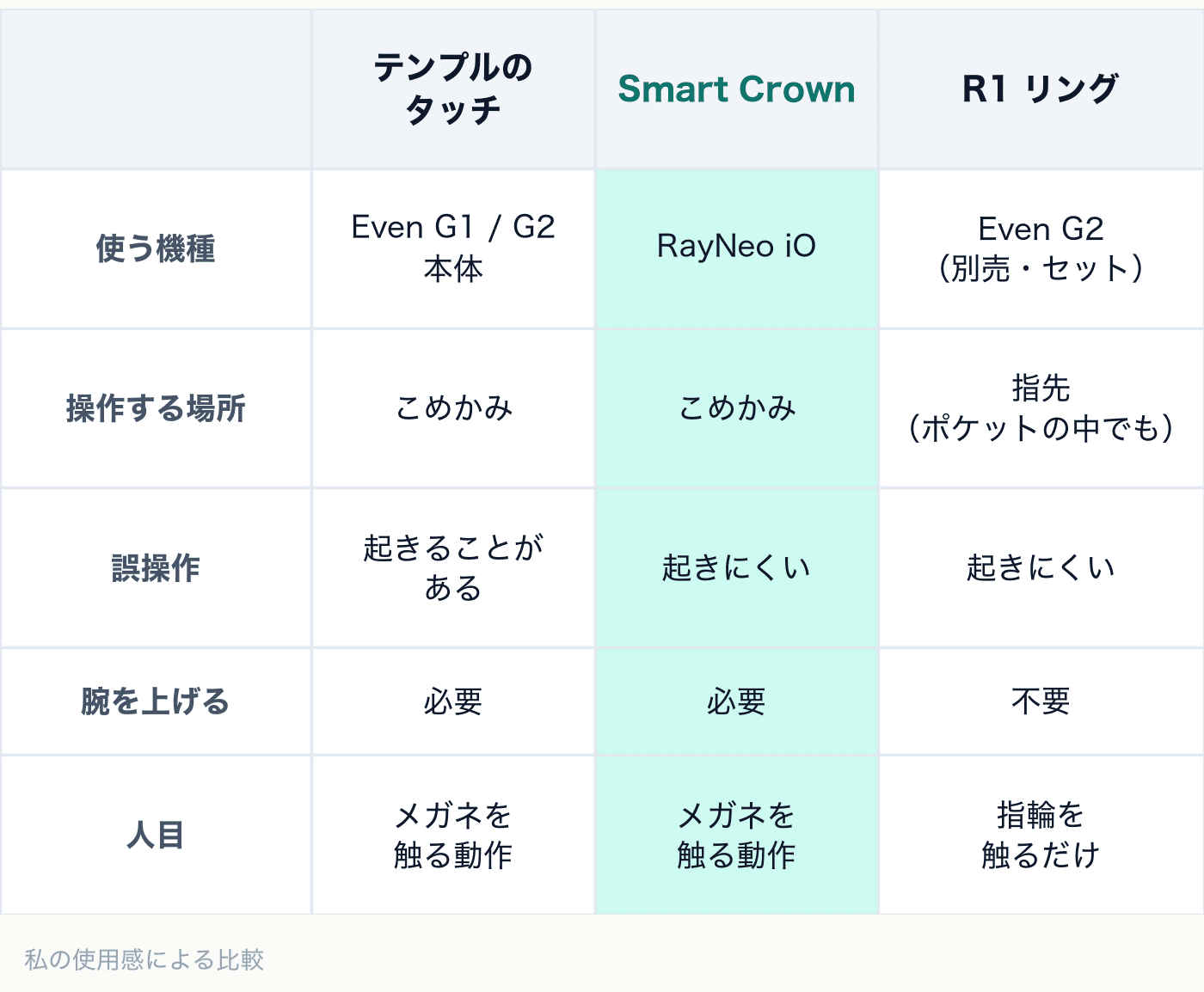
What's disappointing is that, in the end, it's an operation that requires reaching up to the temple. The "ritual of raising your arm to your temple" that I wrote about in the Rokid article also occurs with the RayNeo iO. My standard, the Even G2, allows me to operate it with my fingertips while it's in my pocket if I use the R1. Having grown accustomed to that experience, this feels lacking. However, I think the Smart Crown is the best among temple-operated devices.
Display: It feels a bit narrow and is slightly above
The display area feels a bit narrow compared to my usual experience with the Even G2. Here are the specs:
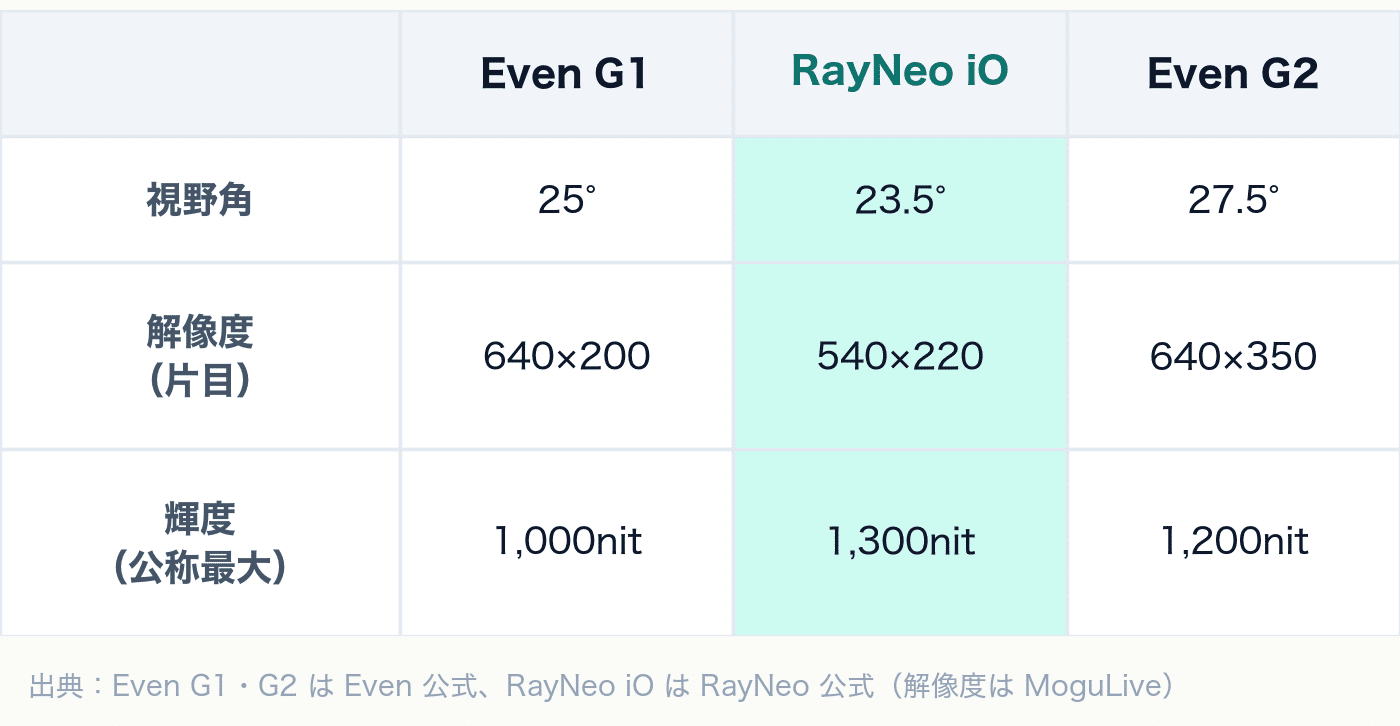
Source: Even G1 is from the official Even website, and RayNeo iO is RayNeo’s official websiteand (field of view and brightness) MoguLiveand (resolution), Even G2 is Even’s official support。
I drew a picture of the size difference.
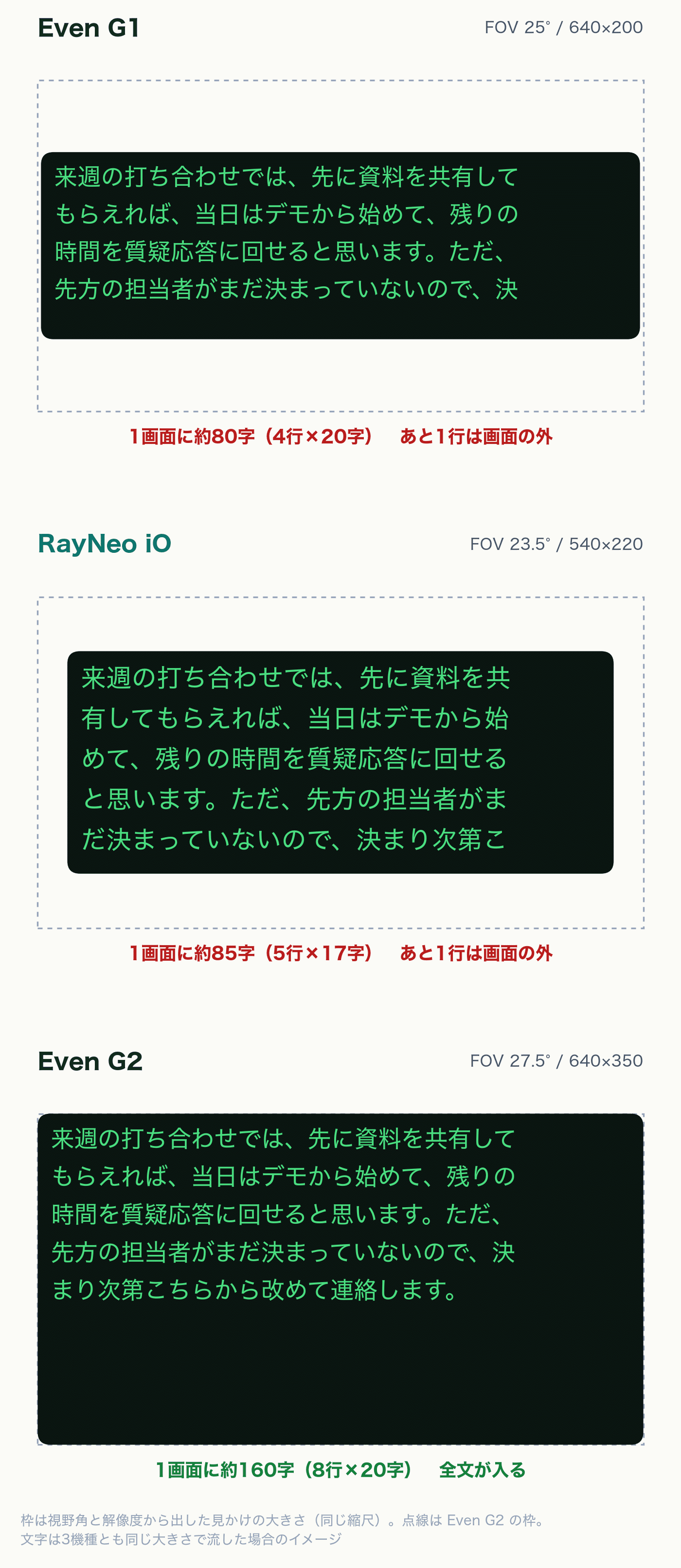
The frame is the apparent size derived from the field of view and resolution, and all three are scaled to the same size. The text inside is an image of the same text size and the same sentence flowing when displayed.
When looking at the numbers, the difference is bigger than I thought. The field of view has a difference of 4 degrees, but the vertical resolution is 220 and 350, and iO is about 60% of Even G2. When comparing the total number of pixels, it's about half.
Even so, the feeling is just 'a bit narrow'. For short notifications or dashboards, the difference is hardly noticeable. The difference comes out in functions like translation or conversation support where text flows continuously. The vertical resolution directly affects the number of lines that can be seen at once. In the review of Even G2, I wrote 'the vertical resolution increased from 200 to 350, and the amount of translation that can fit on one screen increased dramatically', but iO's 220 is almost the same as G1's 200.
This was disappointing for translation. A relatively long phrase does not fit on one screen. While talking, the beginning of the sentence flows up and out of sight, and by the time the end is displayed, the beginning is no longer visible. It's not a problem for short phrases, but in situations like business talks or lectures where sentences tend to be long, it's harder to grasp the whole sentence. However, this is only true for the default settings. As I will write later, decreasing the font size and increasing the number of lines can improve it significantly.
More than the narrowness, the position of the display is effective.
Even G2 has a display area that comes down quite low, so information appears right in front of you without having to move your line of sight. RayNeo iO has an upper display, so you need to move your eyes up slightly to read.
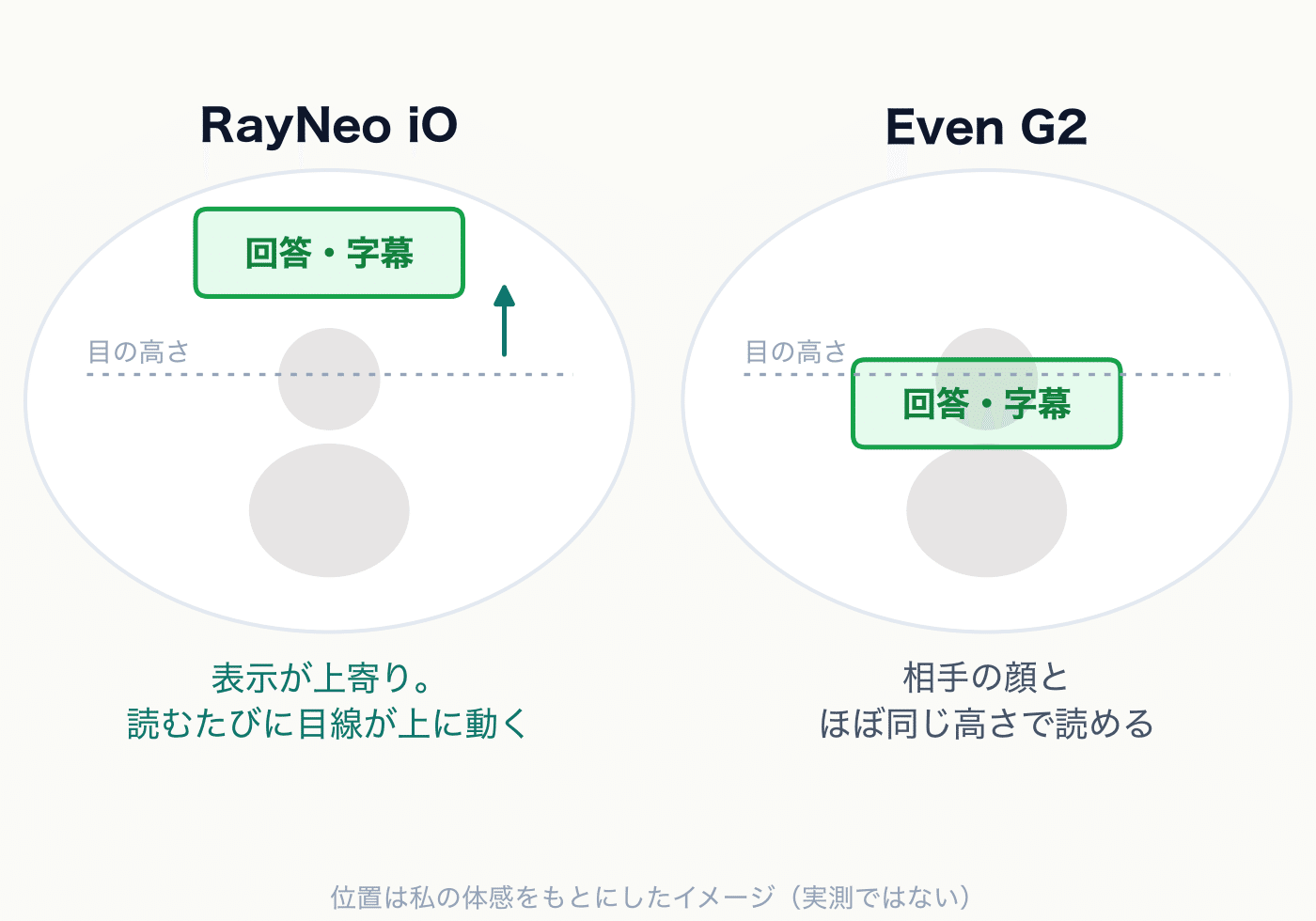
If you're just reading notifications, it's not a big difference. However, since the display is shifted up, I feel like it's easier to miss notifications compared to Even G2. Since it appears slightly outside the center of your vision, you might not even notice that a notification has arrived when you're focused on something.
What's even more troublesome is when I want to read text while talking to someone, such as the answers from Live Q&A or the teleprompter's cue cards. I want to keep looking at the other person's face while reading, but with iO, my line of sight escapes upwards. From the other person's perspective, it looks like my eyes are darting around in the middle of the conversation.
Even G2 also has its limitations depending on the focal length setting. However, if the setting is just right, I can see the other person's face and the text almost simultaneously. This difference is particularly noticeable when using functions during conversations.
In terms of brightness, according to the specifications, RayNeo iO has a maximum of 1,300nit, slightly surpassing Even G2's 1,200nit. Numerically, iO is brighter.
Unfortunately, the official sunglasses clip is not available for purchase. To make the display easier to see in bright outdoor conditions, it's most convenient to darken the outside of the lens. I was also helped by the sunglasses clip when using Even G2.
By the way, when I tried attaching the sunglasses clip I had for Even G2, it fit the RayNeo iO perfectly. I think this might be good enough for me.
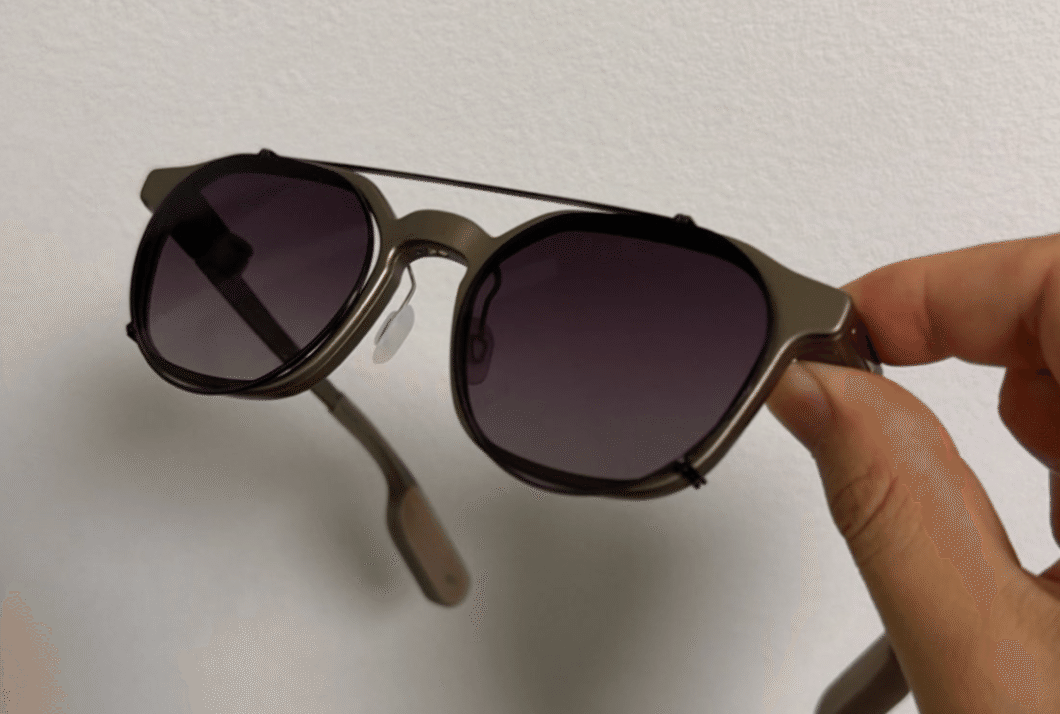
Since it's going to be winter from now on, it might not be a problem for a while. I hope the official version will be released before summer arrives.
Notifications: Basically, there are no issues. It's a shame there's no history
The notification function is basically not a problem. When I receive a LINE message or email, it appears in my field of vision, and I can check the contents without taking out my smartphone. It's reassuring that the most mundane yet important function I use daily is working properly.
What's a shame is that I can't view the notification history.
The standard Even G2 has a screen that allows me to view a list of notifications. It's like the notification center that appears when I swipe down from the top of the iPhone screen. If I want to see a notification that came in earlier again, I can open it from there.
It seems that RayNeo iO doesn't have this feature. What's troublesome is when I'm reading a relatively long notification and accidentally close it. There's no way to view it again, so I end up taking out my smartphone, which is frustrating. Since notifications disappear in an instant, it's especially important to have a place where I can view them again later. As I mentioned earlier, since the display is positioned high and easy to miss, it's even more frustrating.
App: The settings are detailed. Localization is sloppy
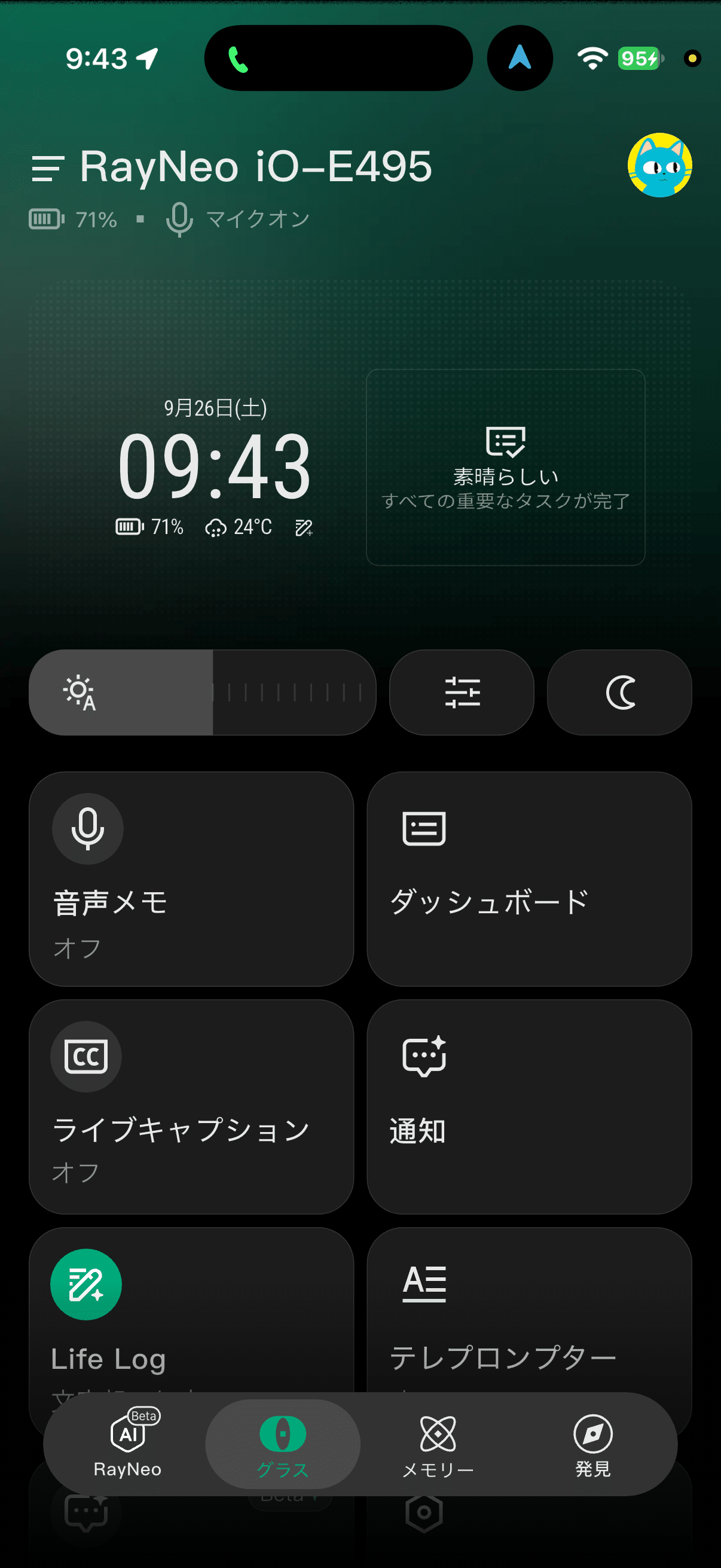
The smartphone app is designed to allow quick access to main functions from the home screen. The tiles are lined up with voice memos, dashboard, live captions, notifications, Life Log, and teleprompter, so I don't get lost.
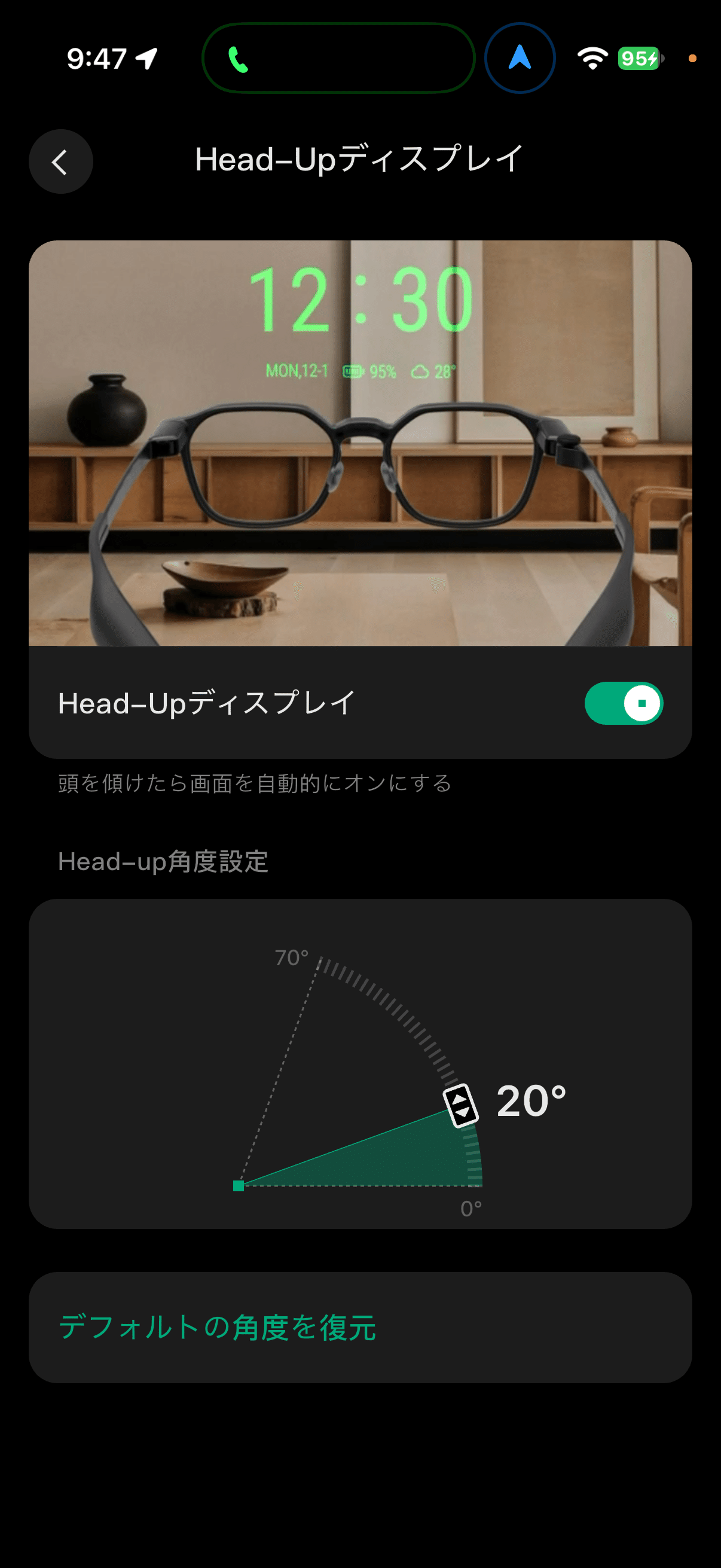
The display appears when I look up
What I liked was the Head-Up Display, which appears when I look up. The idea is the same as the HeadUp on the Even G2, but the angle of response can be set between 0 and 70 degrees. Since I can adjust the sensitivity to match my posture, it's not bad.
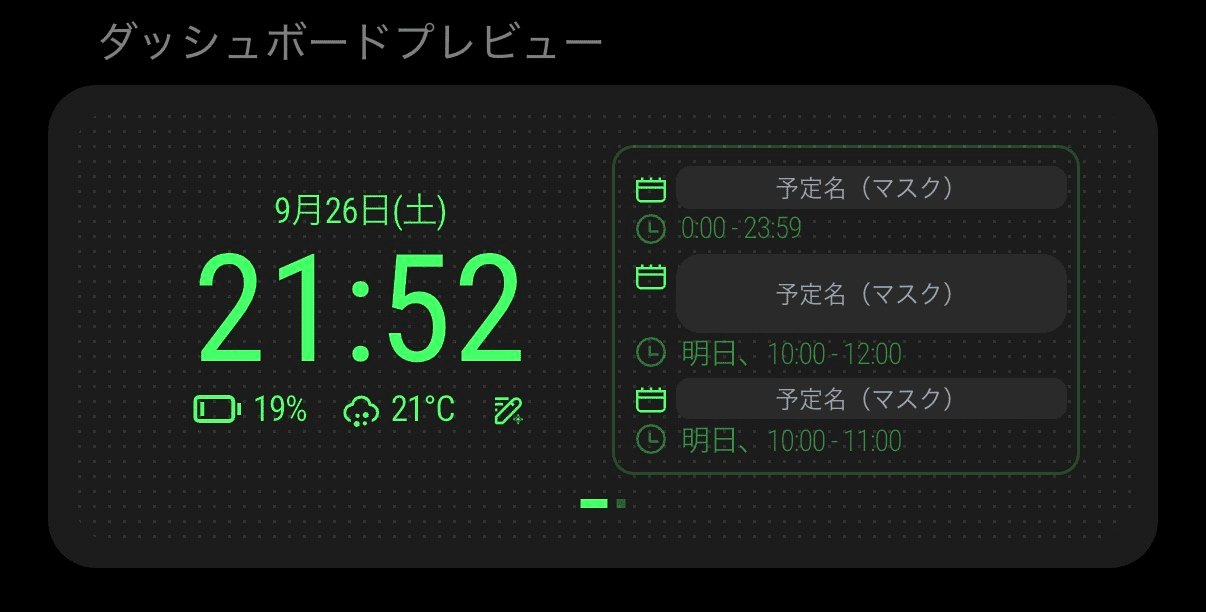
The dashboard can be edited. It can be sent left and right with the Smart Crown.
The dashboard can be edited. You can create your own pages, such as a page for the clock and schedule, and a page for the weather and news. Since multiple pages can be sent left and right by rotating the Smart Crown, you can quickly access the information you want to see. The standard Even G2 also allows editing of the dashboard, so it's on the same level.
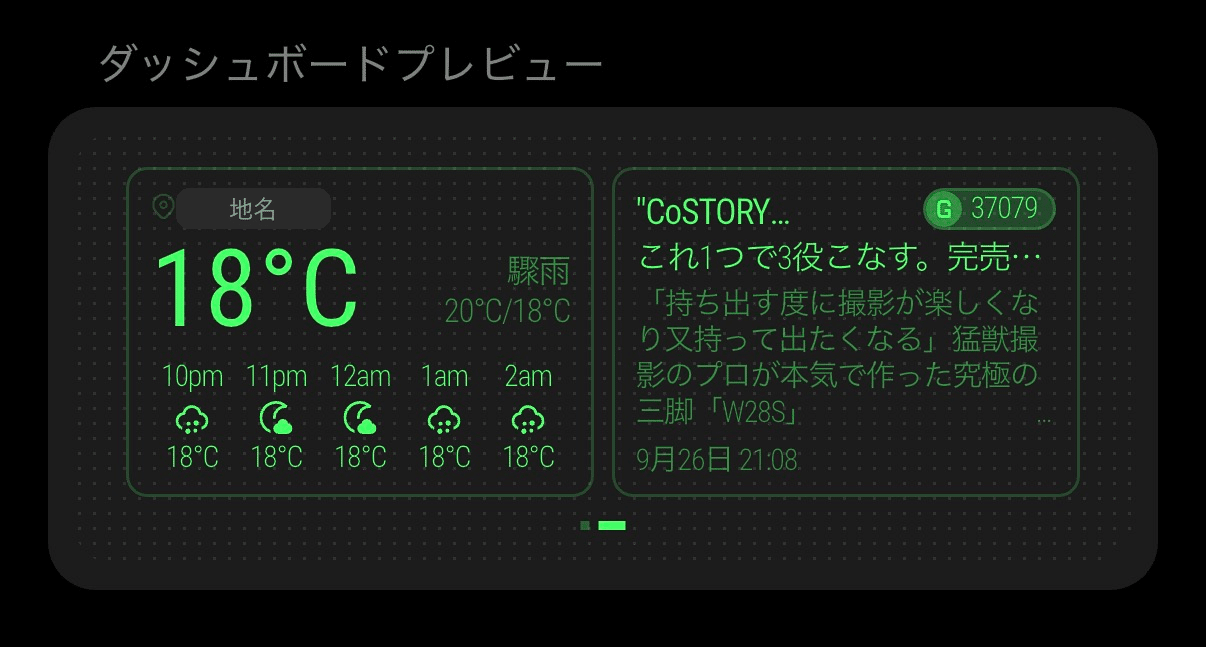
The screen masks the scheduled event name and location.
What's disappointing is the task management. The tasks on the dashboard are managed on the premise of being managed within RayNeo's app. However, tasks are usually managed with apps like Todoist or Google ToDo List, and I don't think many people would switch to a different task management app just for smart glasses.
I think the same about the Even G2's ToDo link. I wrote in the Even G2 review that it's disappointing that it can't be linked with external apps, and the dissatisfaction with tasks still remains. This is something I want to say about smart glasses in general. The information you want to display in your field of vision is usually already in the services you're using. I think it's most important for a device that you wear every day to be able to connect to those services smoothly.
Still, as a later entrant, I wanted the RayNeo iO to at least match existing products in app polish. RayNeo has made many glasses, but most are glasses-shaped external displays that connect to a smartphone for a large-screen experience. The company may have less experience building apps for HUD glasses that you wear every day to show small amounts of information in your field of view. The rough localization I discuss next gives me that impression.
There are places where Chinese remains
On the other hand, the localization is rough. Chinese characters remain in various parts of the UI. For example, in the translation settings screen, you can see Chinese characters like "经典翻译" and "内测中".
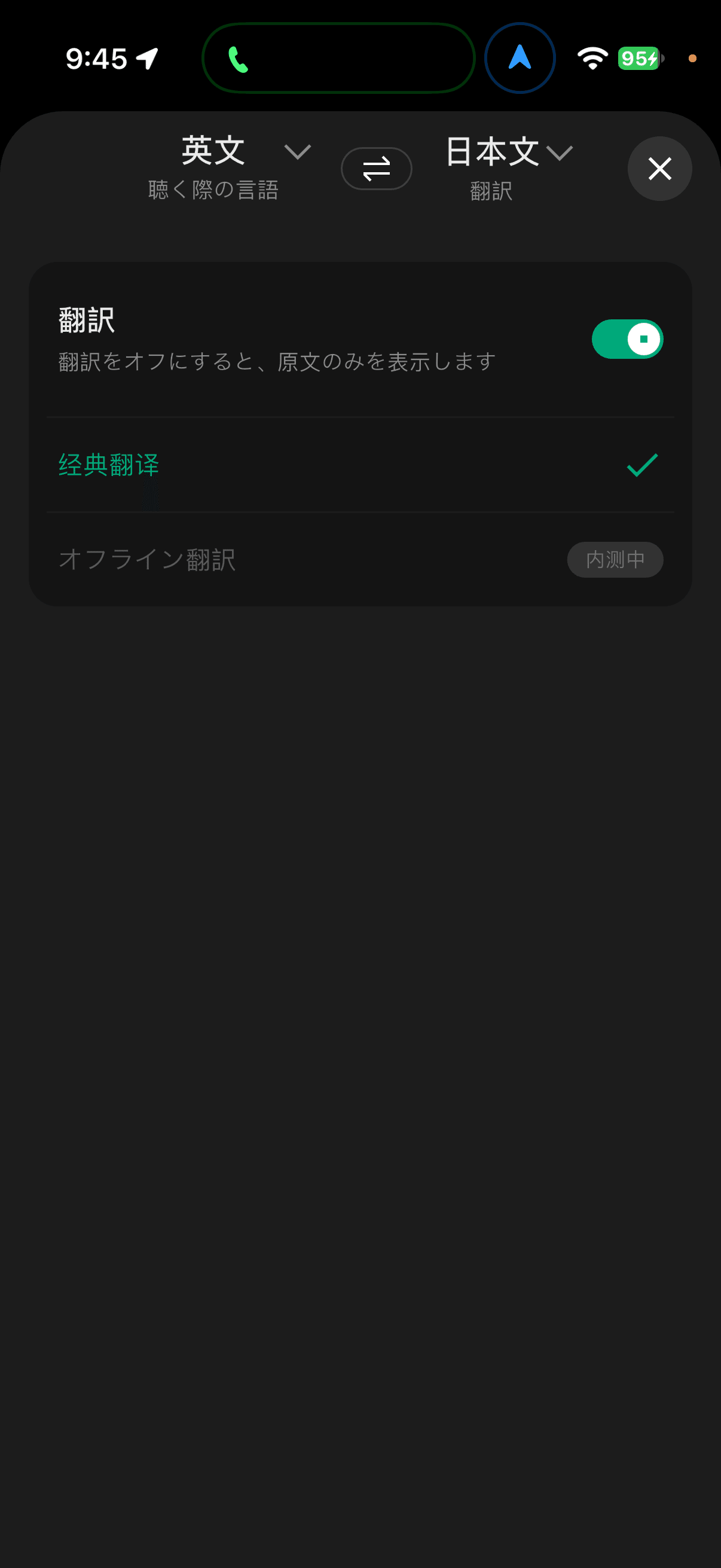
If you're going to sell a product for nearly 90,000 yen in Japan, I want you to do this part seriously. Since it's a part that's not related to the functionality, the low completion quality is particularly noticeable.
Translation: The accuracy and speed are not much different from Even G2
The translation accuracy is not much different from the standard Even G2. The speed at which the translation appears is also about the same. I don't think there's any problem with using either of them for everyday use, such as translating English into Japanese.
The RayNeo iO translation has two display modes. One is the "Real-Time Display" that updates the translation in real-time, and the other is a mode that displays the translation in batches at the end of each sentence.
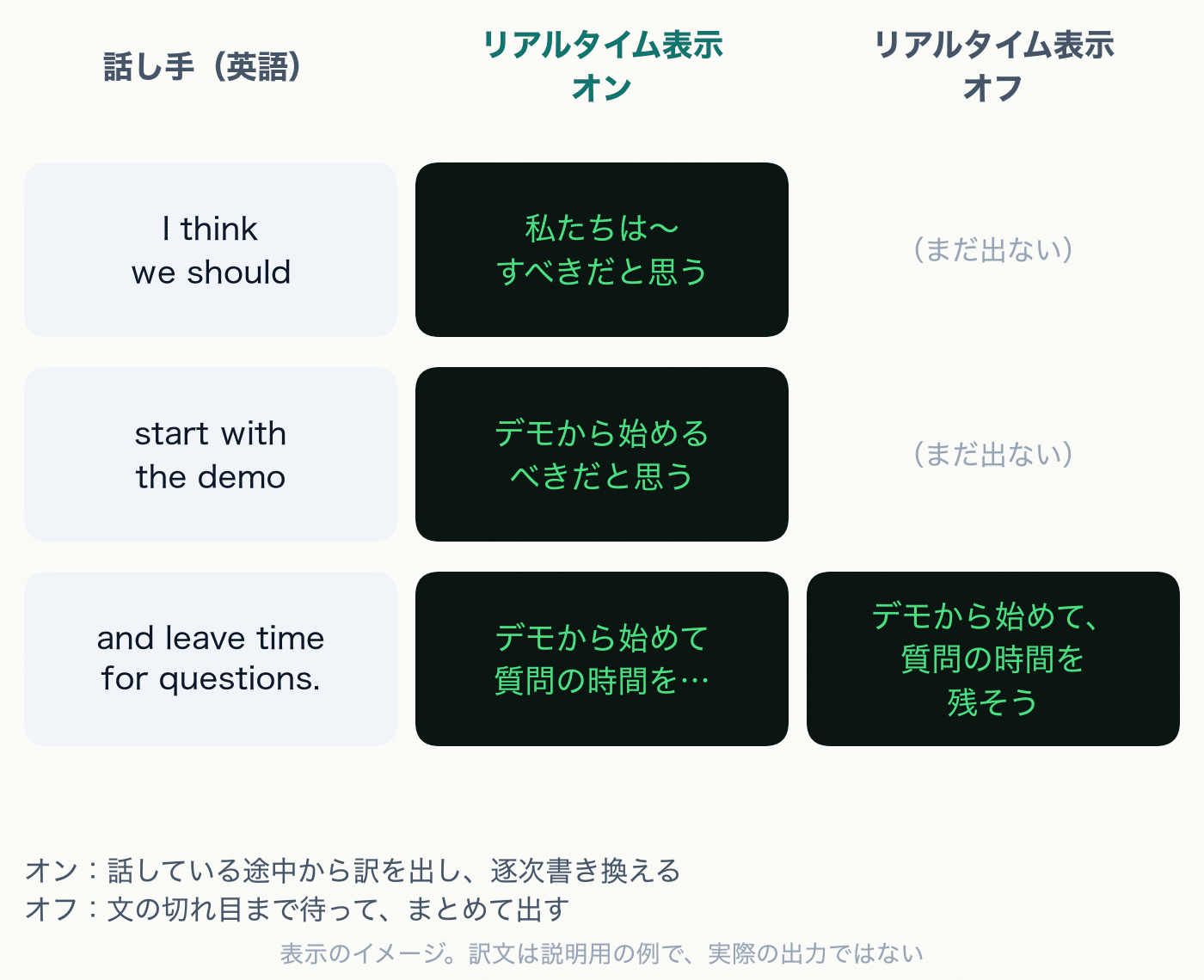
It's a bit disappointing that the speaker's language is not automatically detected, and the opponent's language needs to be manually selected in advance.
The frequency of trouble is not high. I only wanted to switch languages when I went abroad to WWDC, and it was a special environment where people who are not very good at English spoke to each other in a mixture of their native languages. In my daily life, there are almost no opportunities to use anything other than "English to Japanese".
If you make the font smaller, the amount of text displayed is comparable to the Even G2.
As I wrote in the display section, "a fairly long phrase does not fit", but this can be improved quite a bit with settings. In the caption display settings, you can change the font size, width, and number of lines. By reducing the font size and increasing the number of lines, I was able to display a amount of text comparable to the Even G2 on one screen.
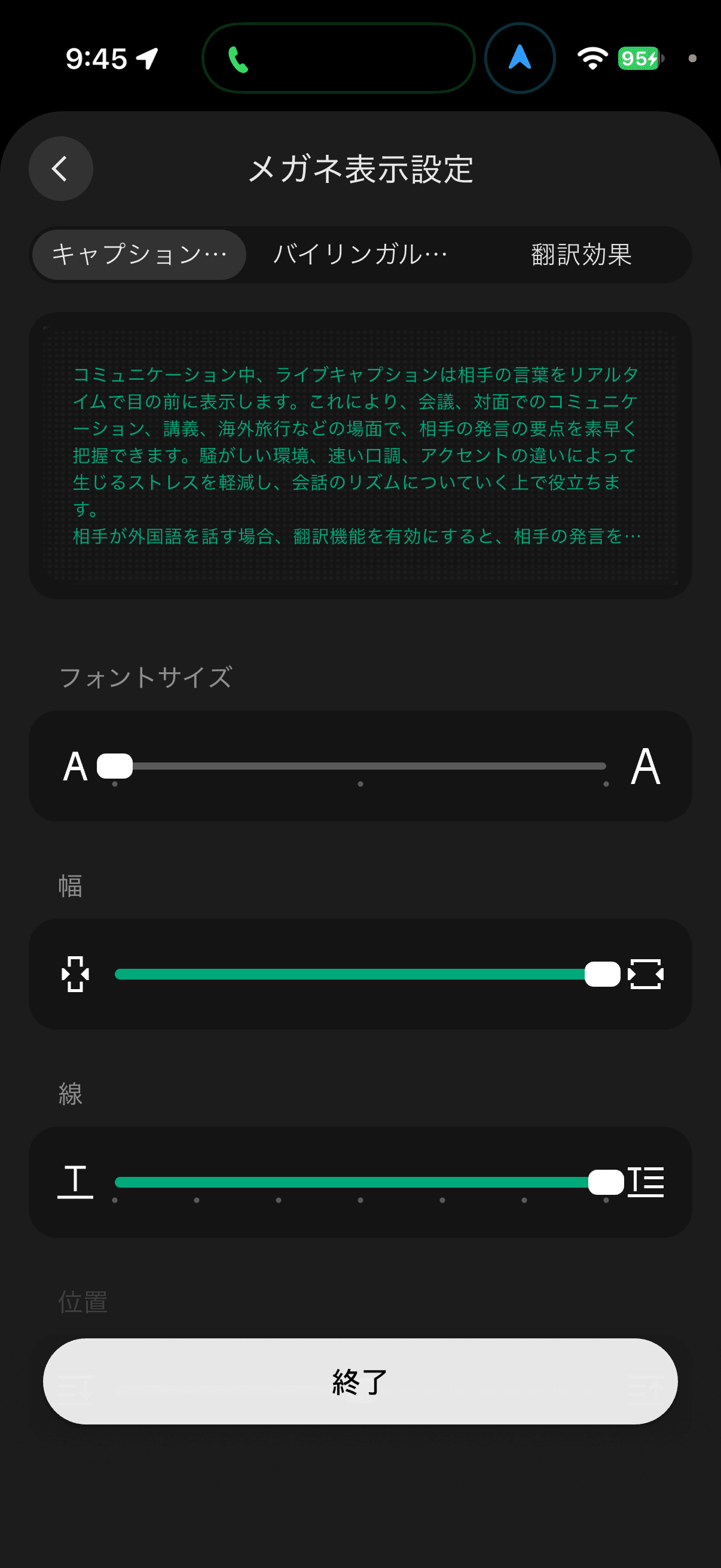
Although the narrowness of the display area itself does not change, it is commendable that this can be compensated for with settings. If you plan to use translation frequently, it is recommended to adjust this setting first.
Bilingual mode is interesting, but the movement is unnatural.
Another interesting feature was bilingual mode. When facing forward, the translated text is displayed, and when looking up, the original text is displayed.
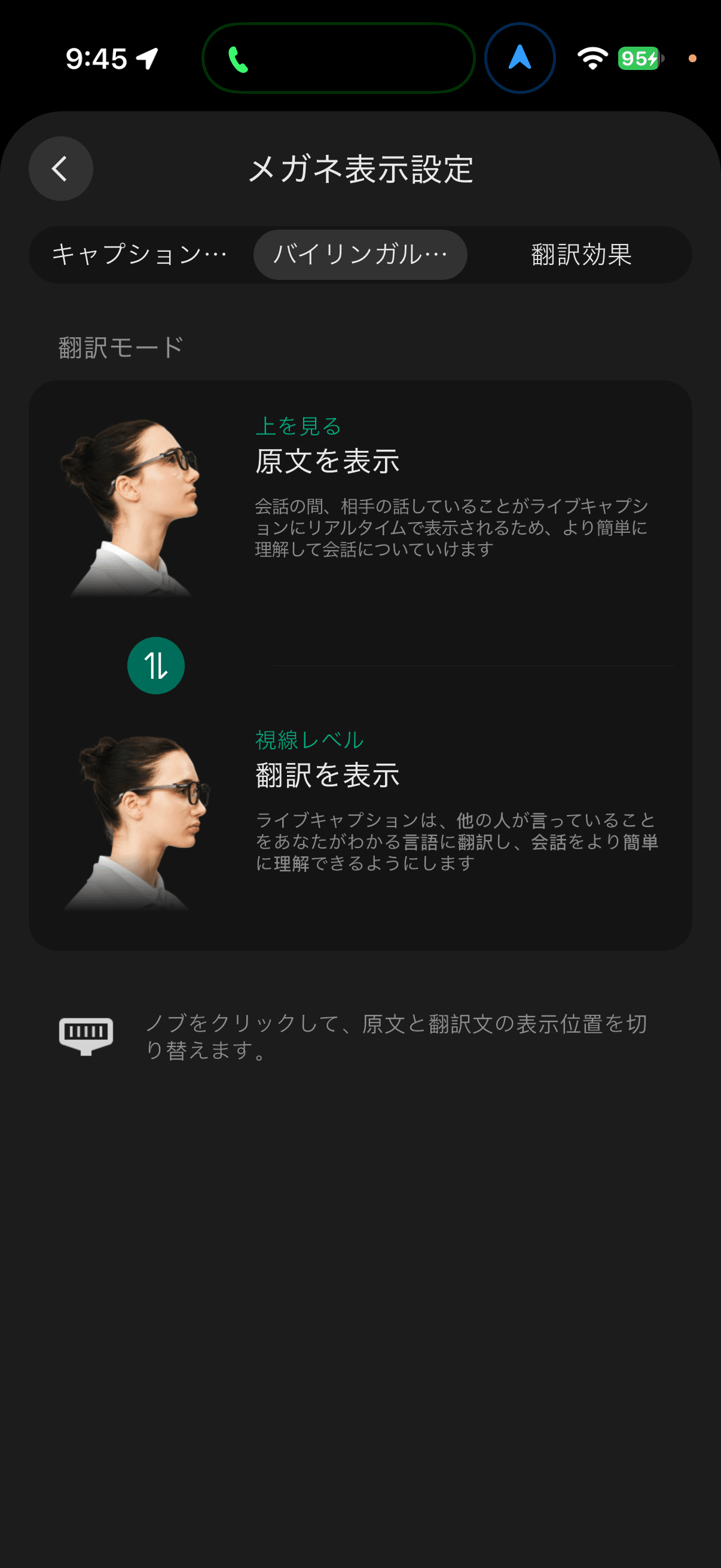
As an idea, it's interesting. However, it's not very natural to look up every time you want to check the original text during a conversation. From the opponent's point of view, it's like talking to someone who suddenly looks up at the ceiling in the middle of a conversation.
In that case, it would be better if it were like the Even G2, which divides the screen into top and bottom and displays both the original text and the translated text at the same time. This way, you can compare both with just a glance.
Live Cue: As a conversation support, it's still a toy
The conversation support function of RayNeo iO is called "Live Cue" in the app and "Live Hint" on the smart glasses side. It's a function that continues to listen to conversations and displays answers to questions that come up in the conversation in your field of vision.
To be honest, this function is not very useful at the moment. It's still in the realm of a toy.
There are three reasons for this.
The first thing is that it only picks up clear questions. It doesn't react unless you ask a question in the form of "What's ~?" or "When is ~?". As a conversation support, I think this is a flaw. There aren't many moments when a question is clearly spoken in a conversation. What I really want to know is something that no one has asked, but I'm the only one who doesn't know.
The second thing is that the answers are shallow. It only returns a brief answer to the question and doesn't delve into the background of the topic or where the conversation is likely to go next.
The third thing is that there is no history. After the conversation is over, you can't look back at what was said.
The standard Even G2's conversation support (Conversate) is completely different from this.
RayNeo iO is,it answers when asked a clear question。
Even G2 is,it anticipates what I'm likely to Google on my smartphone in front of me and looks it up for me in advance。
For example, let's say I was talking to a friend about FF16. No one asked "When was FF16 released?", but Even G2 still shows me information like the release date of FF16 on the edge of my vision. Even if it's not in the form of a question, it catches the flow of the conversation and anticipates what I'm likely to be interested in. After it's over, it also leaves a transcript and summary.
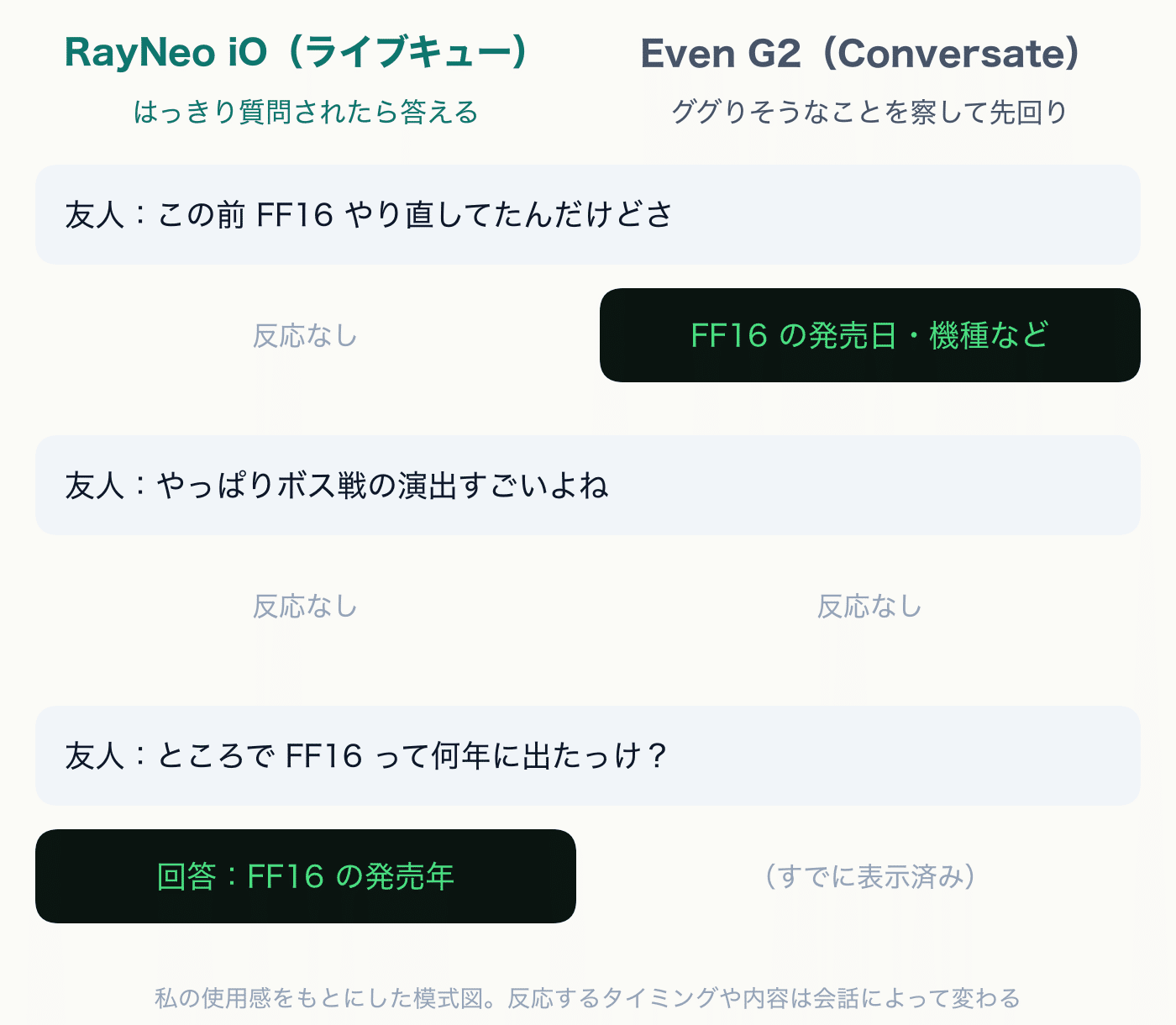
When I wrote "expansion of intelligence" in my review of Even G2, I was referring to this anticipation, or rather, its meddlesome nature. When I first used it, I was genuinely moved, thinking that this is what it means for human intelligence to be expanded. I don't feel that sense of wonder with Live Cue.
It's labeled as a beta, so it may get better from now on. But based on its current design, it seems like it still doesn't grasp the essential value of conversation support. If it's just answering questions, a smartphone's voice assistant can do that too. The value of conversation support lies in its ability to anticipate what you want to know before you ask.
I think that the experience of Even G2's conversation support alone is worth adding 20,000 yen to the price.
The issue of display position also comes into play here. The answers in the Live Cue are meant to be read while talking to the other person. On the iO, the line of sight moves up every time you read an answer, making it a bit difficult to read naturally while looking at the other person.
As smart glasses, the RayNeo iO is only this much. The Smart Crown is good in terms of lightness. The display can be supplemented with settings, but the conversation support is still far from my standards.
From here, I will talk about another aspect.
Another face: When seen as an AI pendant, the hardware is good. The software is still a plaything
The function that the RayNeo iO has but the Even G2 does not is essentially the life log. This one function should drastically change the evaluation.
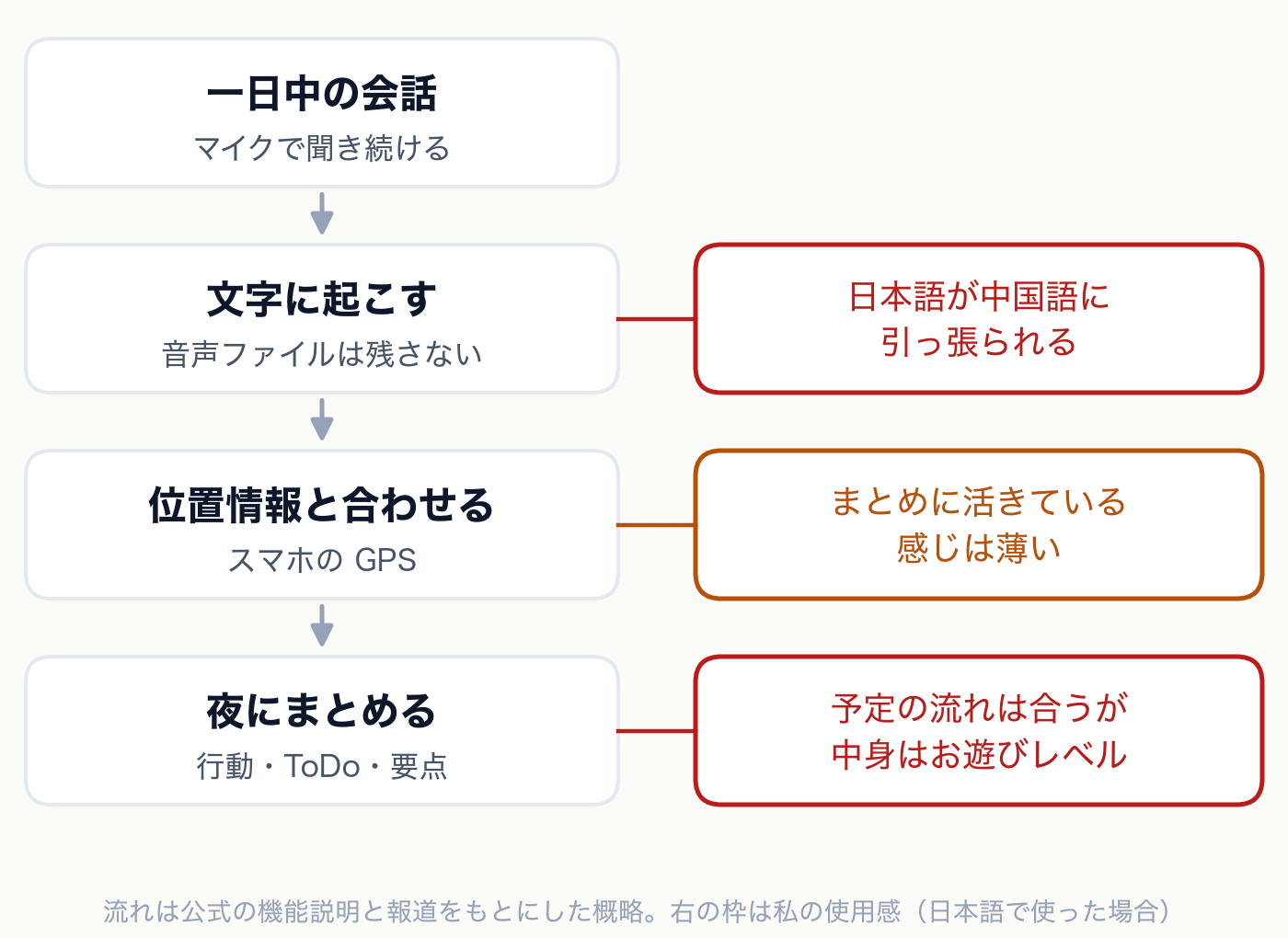
The life log is a function that continuously listens to conversations around you with the microphone throughout the day and summarizes your actions at night. Only text is saved, and no audio files are left (Real Sound)。
I think this is a difference in ideology rather than a difference in functions. The Even G2 is focused on 'what to put in the field of view at this moment.' The RayNeo iO has also reached out to 'leaving that day.'
I think this direction will become a trend. The Apple Watch Series 12 and Ultra 4, announced on September 9, will also have a 'Siri Recap' that listens to and summarizes conversations around you (TechCrunch、Apple Support). It will be provided as a beta from the second half of 2026, initially only in English. Devices that can always listen to you, not limited to smart glasses, will increase from now on. The RayNeo iO has gotten on this trend early.
The directivity is quite good
When viewed as a device, the strong point is the directivity. It is equipped with a 4-microphone array and a bone conduction sensor, and can switch between a mode that picks up only the voice of the person in front and a mode that picks up the entire surroundings. For face-to-face conversations, it's just the front, and for conference rooms, it's the whole area. Just having this switch makes a big difference in the quality of the recording.
This is easier to understand compared to Rokid Glasses. I also used Rokid Glasses, but the sound collection was subtle, and the directivity that picks up the voice in the direction it is facing is not very high. RayNeo iO seems to be as good as the standard Even G2.
Limitless with one pair of smart glasses
The one to compare with this face is AI pendants. The representatives are Limitless and Plaud. These two are AI pendants, but they have different roles.
-
LimitlessOne that records all day, the "full recording type", a tool for lifelogs
-
Plaud(NotePin)One that records by pressing a button during meetings or discussions, the "minutes type", not for lifelogs
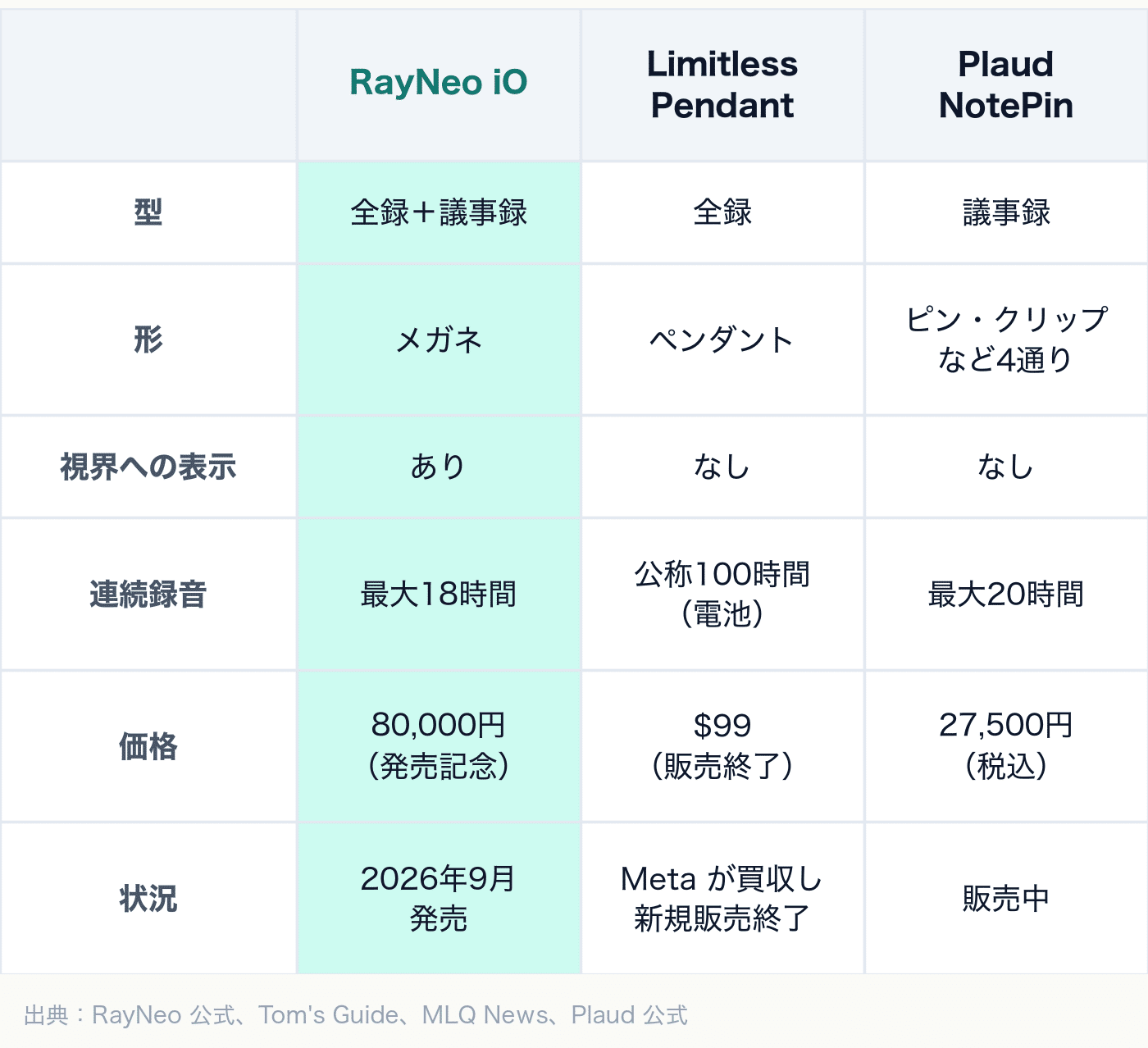
Source:Keitai Watch、Tom's Guide、MLQ News、Plaud official
When comparing, it becomes clear that RayNeo iO is trying to do both types with one device. It records lifelogs while recording the day, and takes voice memos during meetings. It's an idea to replace Limitless and Plaud with one pair of smart glasses.
Moreover, AI pendants do not have a screen. The recorded content can only be read later on a smartphone. RayNeo iO is a pair of smart glasses that can be worn every day, with recording capabilities, and can also display text in the field of view. I felt like I had a voice recorder with a display attached to my smart glasses.
Just looking at the hardware, the price of 90,000 yen also changes. AI pendants alone cost 20,000 to 30,000 yen, but the iO comes with a full set of smart glasses. The problem is the software that runs on it.
It's also symbolic that Limitless was acquired by Meta. Meta has Ray-Ban Meta. The function of "listening and summarizing all day" is being absorbed from pendants alone to devices like smart glasses that can be worn every day. RayNeo iO can be said to be a product that has taken the lead in this trend.
The level of lifelogging: honestly, it's just for fun right now
The hardware is good. So, how about the content of the lifelog? To conclude, as long as I use it in Japanese, the current accuracy is just for fun. It can follow the flow of my schedule to some extent, but almost none of the conversation content is recorded.
This is what the actual 'daily summary' screen looks like. The content includes work-related information, so it's masked.
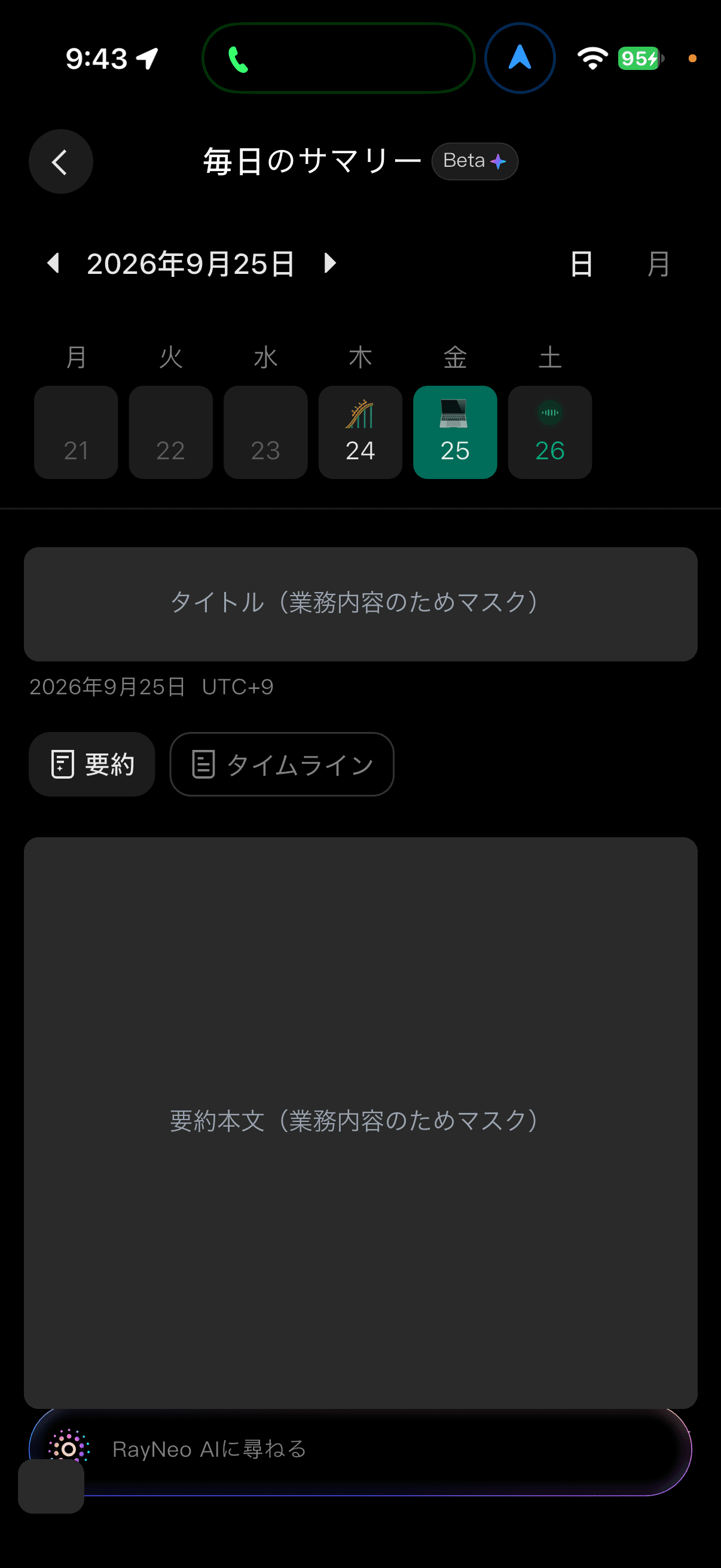
Since it's linked to the calendar, the flow of my daily schedule is roughly correct. The timeline also shows my travel route on a map, so location information is properly recorded.
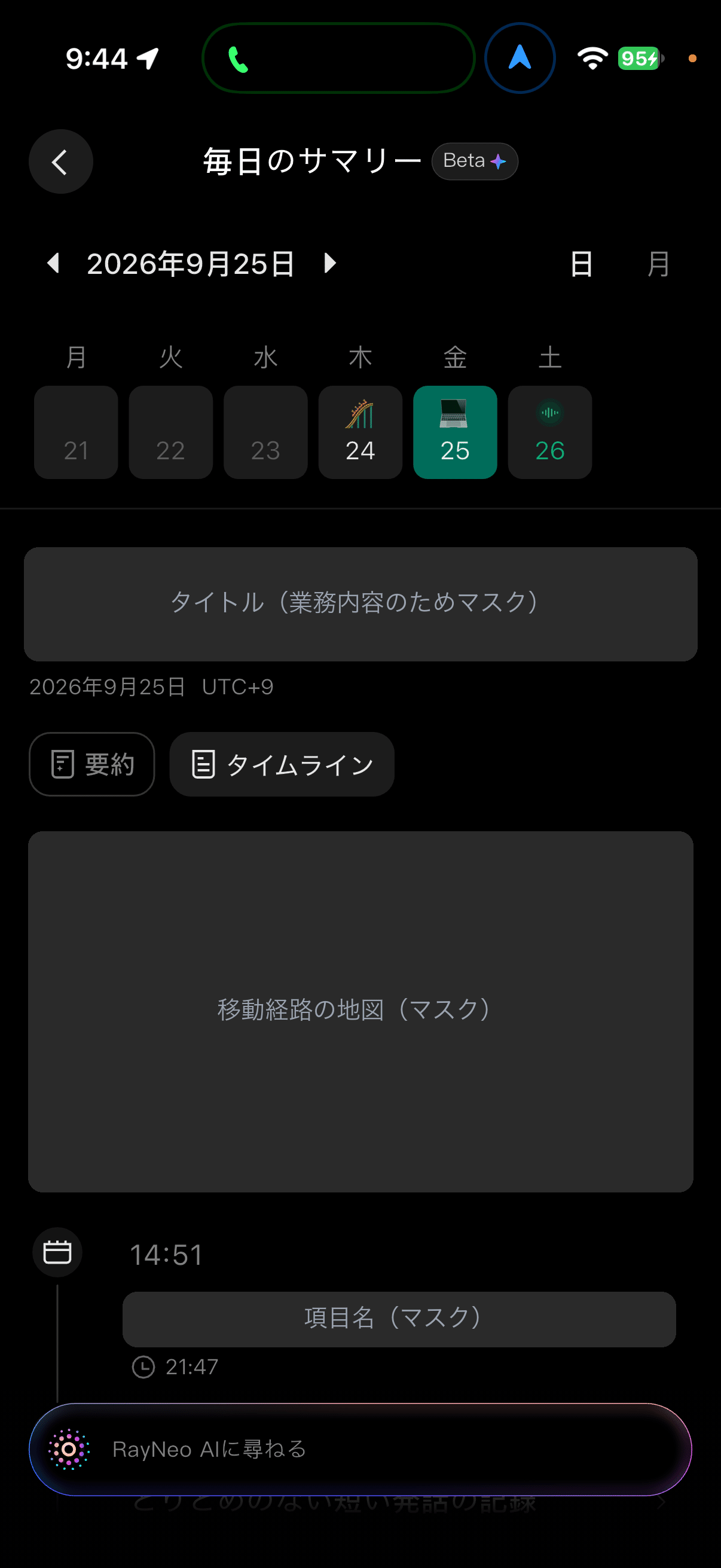
The problem is how much of this information is reflected in the summary article. Honestly, I'm not sure. It has location and schedule information, but the article seems to be pulled in the direction of the voice content.
The biggest problem is that the accuracy of the transcription, which is the foundation, is extremely low. Even though it's a Japanese conversation, it's heavily influenced by Chinese. When I recorded a casual morning conversation, the original record was like this.
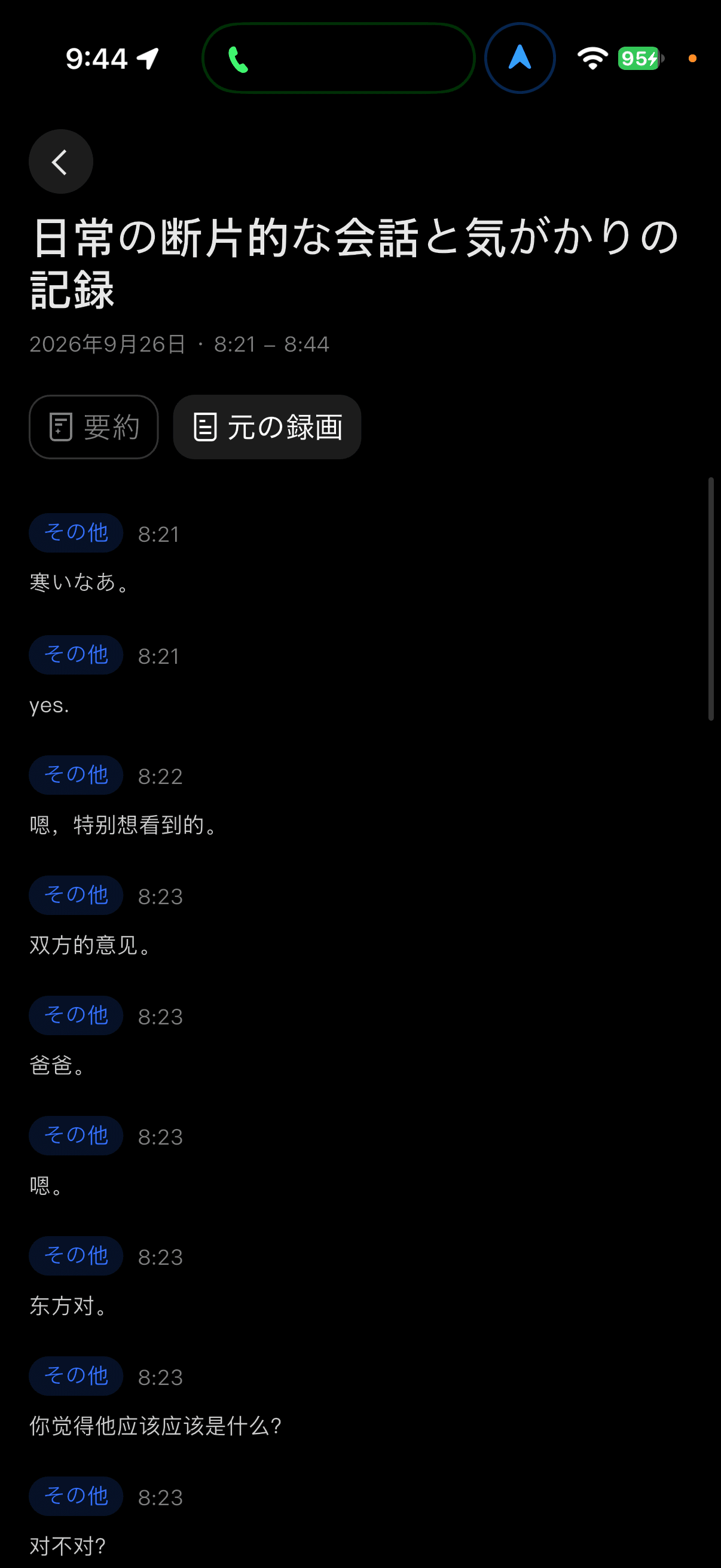
Only 'it's cold' is correct, but after that, it's mostly transcribed as Chinese. If the transcription deteriorates this much at the initial stage, the summary created on top of it will also significantly deteriorate. The meeting minutes of Teams' Copilot are still better than this.
The summary of AI pendant Omi was also honestly bad, but I don't think it was this bad. At least, it's not at the level where it can write down ideas that come up during conversations. It's still unusable as material for writing reports.
Perhaps it's not a problem for people who speak Chinese, though. Looking at how the transcription is biased towards Chinese, it's possible that it's tuned with Chinese conversations in mind. However, since it's being sold in Japan, it's meaningless if it can't be used in Japanese.
However, this is a matter of software. Speech recognition and summarization are areas that can improve dramatically if the model changes, so there's a lot of room for improvement. I want them to use a better transcription model or allow us to choose our preferred model like AI assistants.
That's why I think they should put more effort into this. When comparing the display, operation, and conversation support to the standard Even G2, the only area where RayNeo iO can clearly win is lifelogging. It's a shame that its strongest weapon is only at a 'just for fun' level in Japanese.
It doesn't record when folded. That's correct, but it's a shame.
What caught my attention is that it doesn't record when the smart glasses are folded.
I think it's reasonable as a specification, because I'm afraid that if I take off my smart glasses, they will continue to record automatically. But I think it's worth considering a bit more.
The smart glasses can be folded and hung around my neck. It's the style of putting it on my shirt collar. At that time, I want it to continue recording as a pendant.
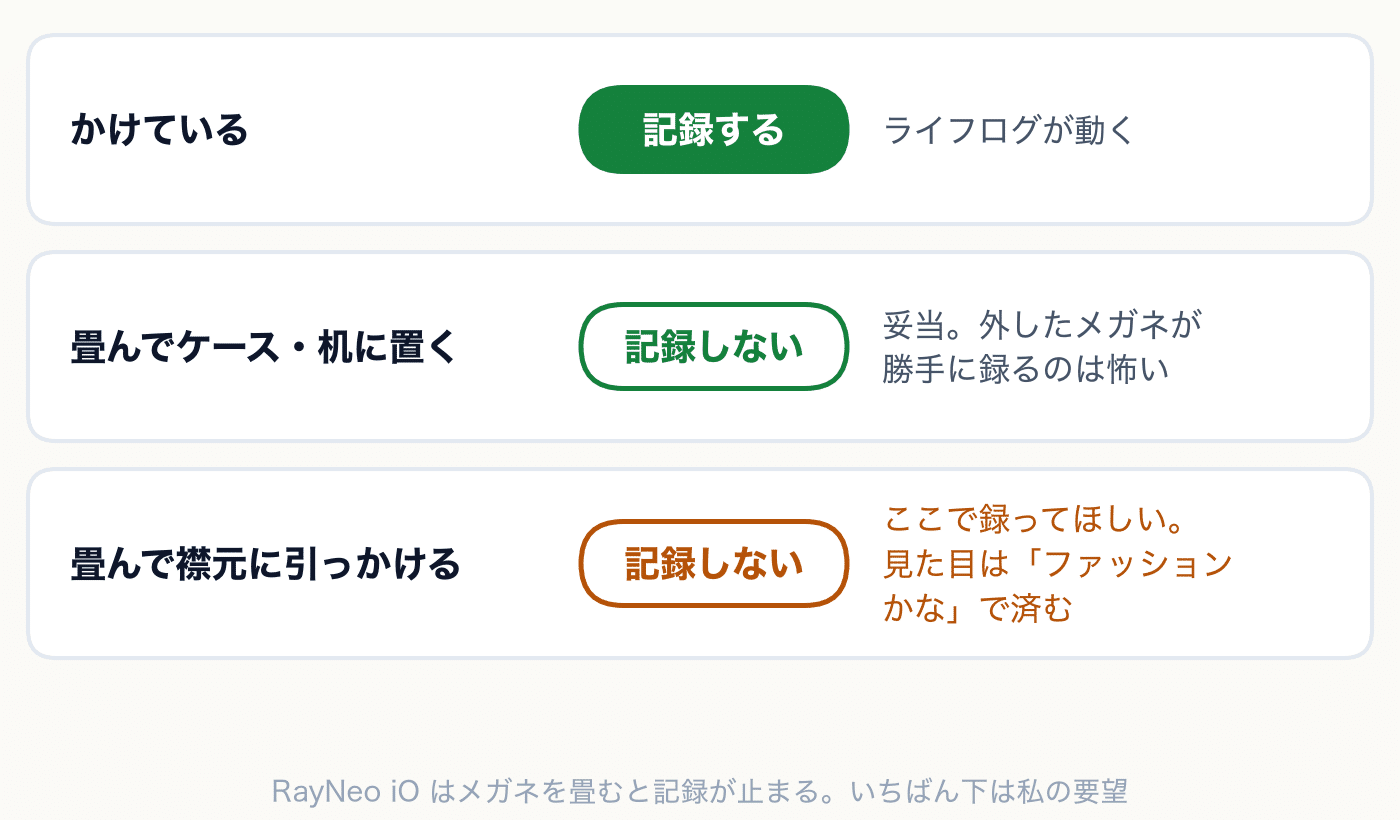
The biggest problem with AI pendants is their presence. When you hang a round device from your neck, you can't help but think "what's that?". If you just hang smart glasses around your neck, people around you will think "oh, it's just a fashion item". The problem that pendants have been facing can be solved naturally with the shape of smart glasses.
If you're going to do lifelogs with smart glasses, I wanted them to be usable not only when I'm wearing them but also when I'm hanging them. The current RayNeo iO doesn't have that flexibility.
Is the camera bad but the microphone okay?
I'll point this out myself.
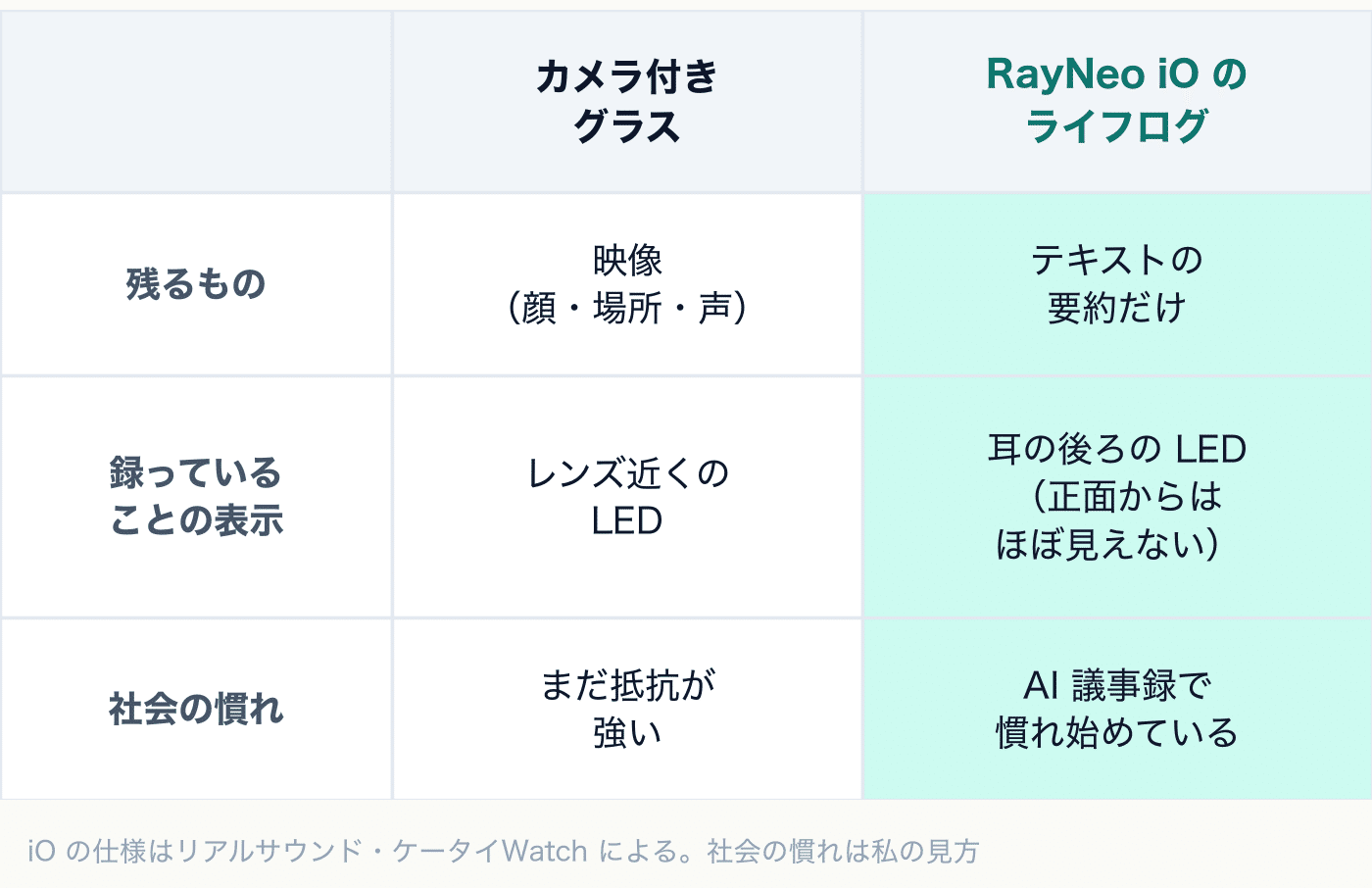
In the article about Rokid Glasses, I criticized camera-equipped smart glasses, saying "you can't tell from the outside whether they're taking pictures or not". Then, what about lifelogs that listen to conversations all day? The structure is the same.
The RayNeo iO also has a white LED on the tip of the temple that lights up when the microphone is working. This is the LED that was lit in the photo in the section on wearing comfort. However, since it's located behind the ear, it's almost invisible to the person you're talking to in front of you (The Ghost Howls also pointed out the same point). Moreover, I wrote earlier that "I want it to record even when I'm hanging it around my neck". The presence becomes so invisible that the other person won't notice they're being recorded. Convenience and invisibility are two sides of the same coin here.
Still, I don't think cameras and microphones are the same. There are two reasons for this.
One is that what remains is different. The RayNeo iO's lifelog doesn't save audio files, but only saves text summaries. Faces, locations, and voices themselves are not recorded. The damage caused by leaked images from cameras is different from that of leaked audio.
Another thing is that society has already started to get used to this direction. Recording online meetings and AI minutes have become commonplace. Apple Watch has also announced a feature to summarize surrounding conversations. I think the resistance to being summarized when asked will fade faster than the resistance to being photographed.
Of course, it's a fact that there are people who care about it. Just because I don't care about it doesn't mean that the whole society doesn't care about it. I wrote about this in Rokid's article. That's why I don't keep my lifelog running every time I talk to people. If it's a work meeting, I'll say something. For now, that distance is just right.
By not installing a camera, RayNeo iO has reduced social friction. At the same time, it has also introduced another friction with lifelogs. RayNeo itself should work on this a bit more. For example, adding LEDs to a position where they can be seen from the front. That alone should change the impression significantly.
Positioning: I want the concept to be clarified a bit more
Here, I'd like to organize the product's position once.
Even is heading towards high-end glasses
The standard Even G2 has a tendency to be branded as high-end glasses, I think. The frame is made of magnesium and titanium, and you can try it on and buy it at a glasses store in Ginza (JUN GINZA). It's more like selling functional glasses rather than smart glasses. The price of 100,000 yen is also relatively easy to accept as a high-end glasses.
RayNeo's iO: a completely different genre
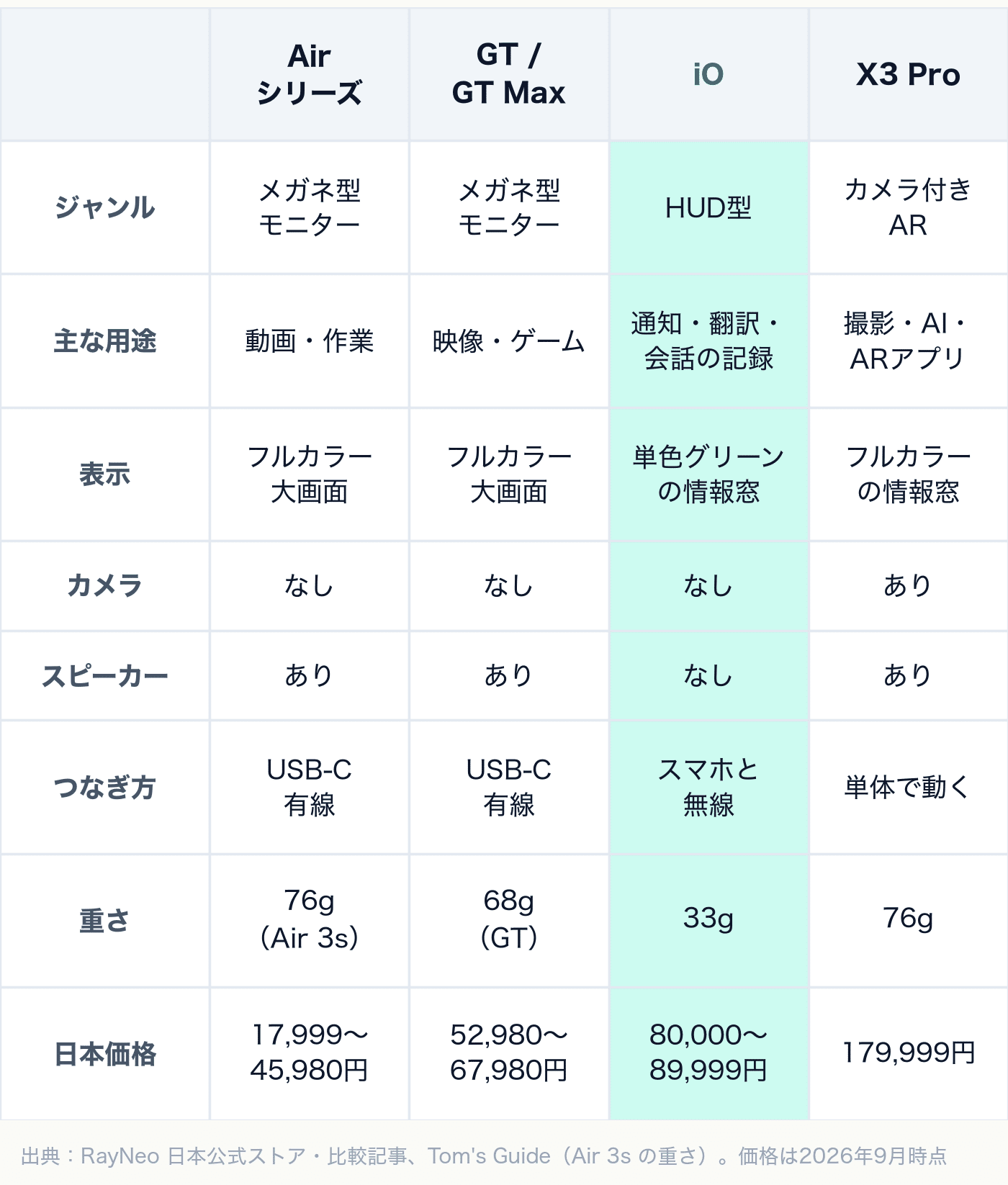
On the other hand, RayNeo is a manufacturer that releases a wide range of smart glasses. However, even within the same RayNeo glasses, there are products with completely different genres. If we don't separate them, we can't make a correct comparison.
-
Glasses-type monitor: Air series, GT, GT Max. Connect to your smartphone or PC via USB-C and display a full-color large screen in front of your eyes. It's for watching videos, playing games, or working, and it's not something you wear every day.
-
HUD type: iO. Connect to your smartphone wirelessly and display a small monochrome information window on the edge of your vision. It's for notifications, translations, conversation records, and other daily uses.
-
Camera-equipped AR: X3 Pro. Equipped with a camera and chip, it can operate on its own. In addition to a full-color information window, it can also handle shooting and AR apps
If you line them up in order of price, the iO is around this area.
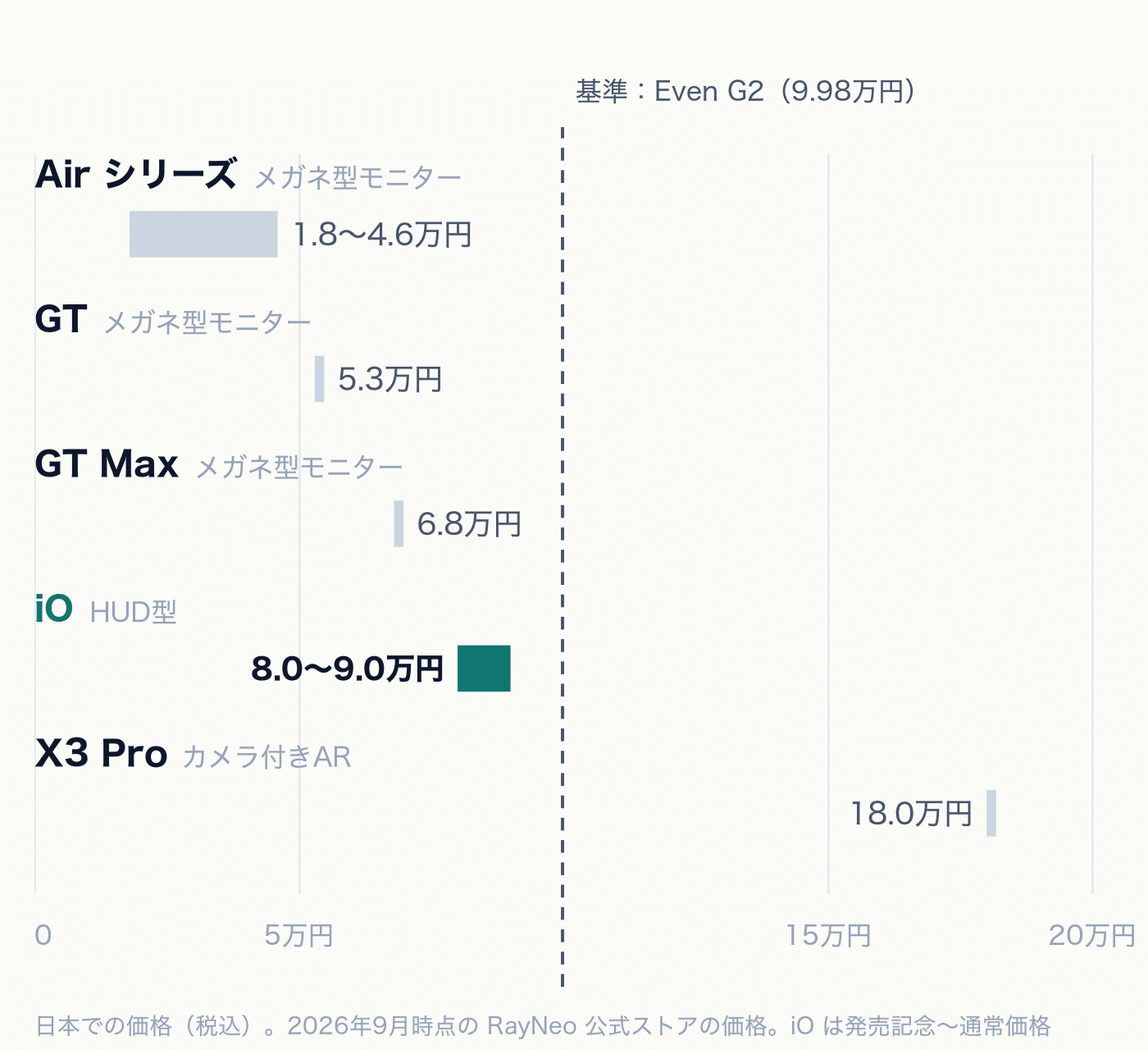
Most of RayNeo's lineup is monitor-type glasses, and the X3 Pro with a camera is above them. The iO is a HUD-type that is placed in between. Just looking at the price, it's 'more expensive than the GT Max and less than half the price of the X3 Pro', but since the genre is different, it's not a relationship where it's a higher-end model just because it's more expensive than the GT Max.
iO among smart glasses with a screen
What should be compared is other HUD-type smart glasses. If I line up the three units I actually used, by price and weight, it looks like this.
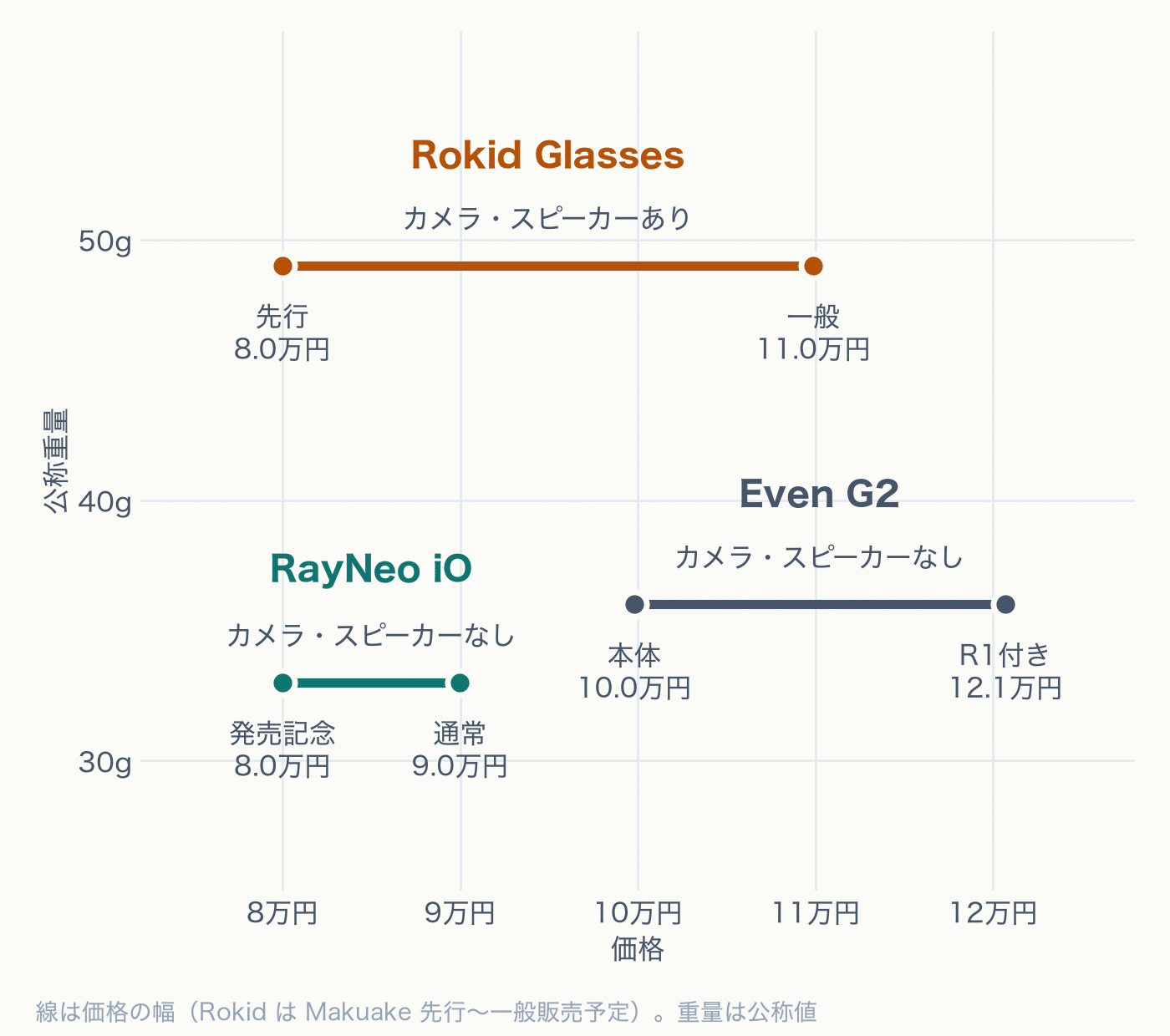
The RayNeo iO and Even G2 are both on the subtractive side, without cameras or speakers, and weigh in at around 30g. The Rokid Glasses are in the same price range, but with a camera and speaker, they weigh around 49g, which is clearly heavier.
Looking at the same subtractive side, the iO is lighter and cheaper than the Even G2. The price difference is about 10,000 yen for the regular price of the main unit. If you add the R1 to the Even G2, the difference expands to about 30,000 yen.
It's expensive to be called cheap, and a bit cheap to be called high-end
When lined up like this, the ambiguity of the iO's concept becomes apparent.
When viewed as a cheap smart glass, the price of around 90,000 yen is a bit hard to swallow. The same HUD-type Rokid Glasses could be bought for 80,000 yen at the pre-order price. On the other hand, if you try to sell it as a high-end glasses like the Even G2, it's a bit cheap, given that it already has a predecessor. The lightness when held in your hand and the appearance of the front coating also seem slightly different from the high-end route.
I think it would be more convincing if it were to lean towards either side. Either 'AI glasses that can be worn every day for 60,000 yen' or 'high-end glasses that are expensive but satisfying, with attention to texture'. The current RayNeo iO seems to be wavering in between.
Who should buy it
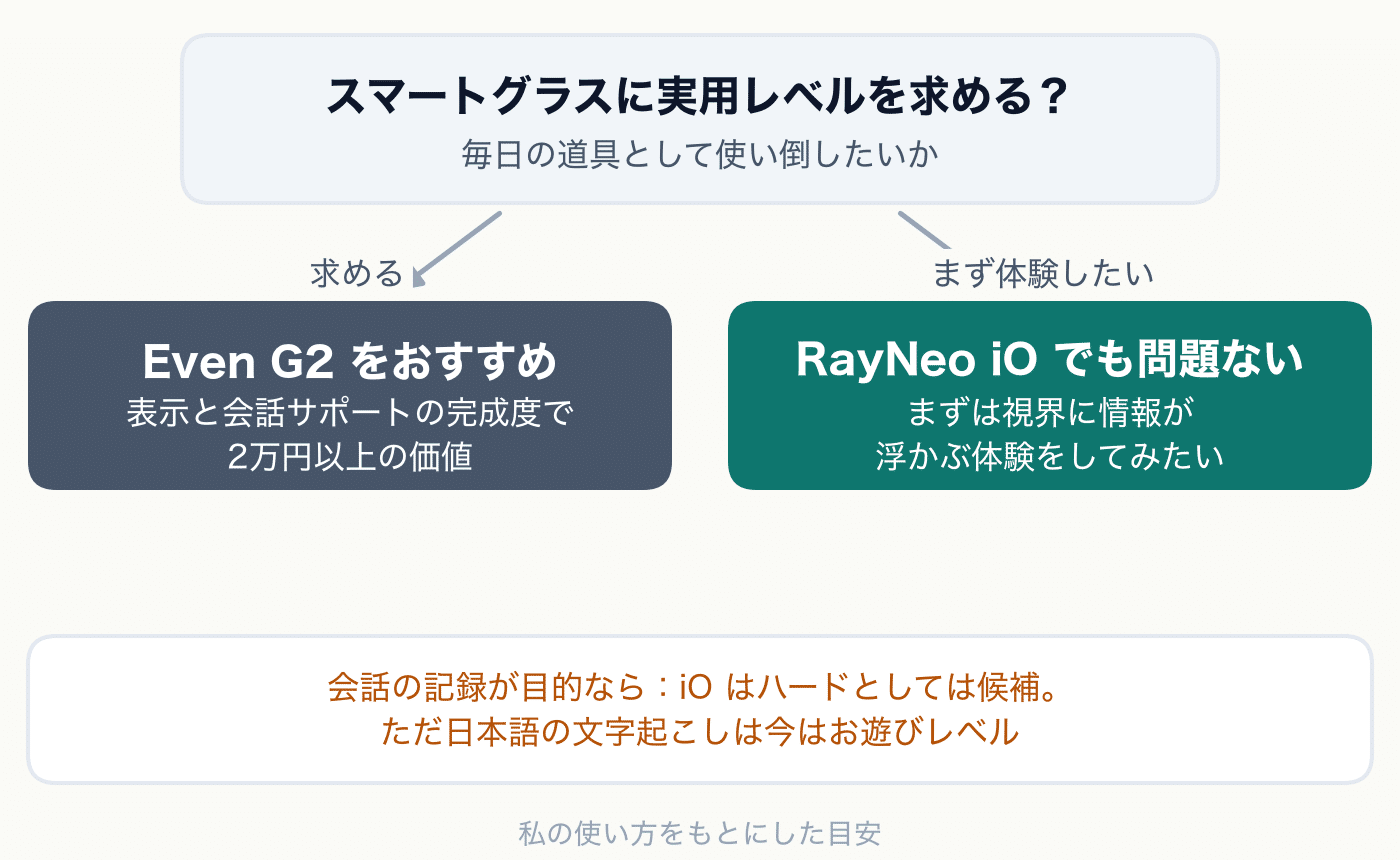
For those seeking smart glasses with practical level functionality, I recommend Even G2
Considering the width of the display area and the completeness of conversation support, I feel that Even G2 is worth paying over 20,000 yen more for. The display position, notification history, preemptive Conversate, and R1 are all notable features. Especially, the conversation support is valuable enough to pay the difference. If you're looking for practical-level smart glasses that can be used as a daily tool, I'd like to recommend Even G2.
For those who want to try it out first, RayNeo iO is also acceptable
If you just want to try out smart glasses to see what they're like, without expecting practical level functionality, then RayNeo iO is fine. It has a full range of notifications and translation features, and the Smart Crown operation is easy to understand. However, it's best not to expect too much from the conversation support, but the experience of having information float in your field of vision is still enjoyable with iO.
For those whose purpose is to record conversations, the hardware is a candidate, but the software needs to be observed
If you're torn between Limitless, a full recording type, or Plaud, a minutes-type AI pendant, then RayNeo iO can be considered a candidate. It has sufficient sound collection capabilities and displays information on the spot. Not having to wear a dedicated device around your neck is also a significant advantage.
However, the accuracy of Japanese character transcription and summarization is currently at a playful level. I felt it was stricter than Omi. Since the hardware has good sound collection capabilities, it's suitable for those who can wait for the software to catch up.
Summary
RayNeo iO is not a bad product. The decision to focus on the display, without a camera or speaker, is the same as Even G2, and I think it's on the side of 'now is the time for subtraction'.
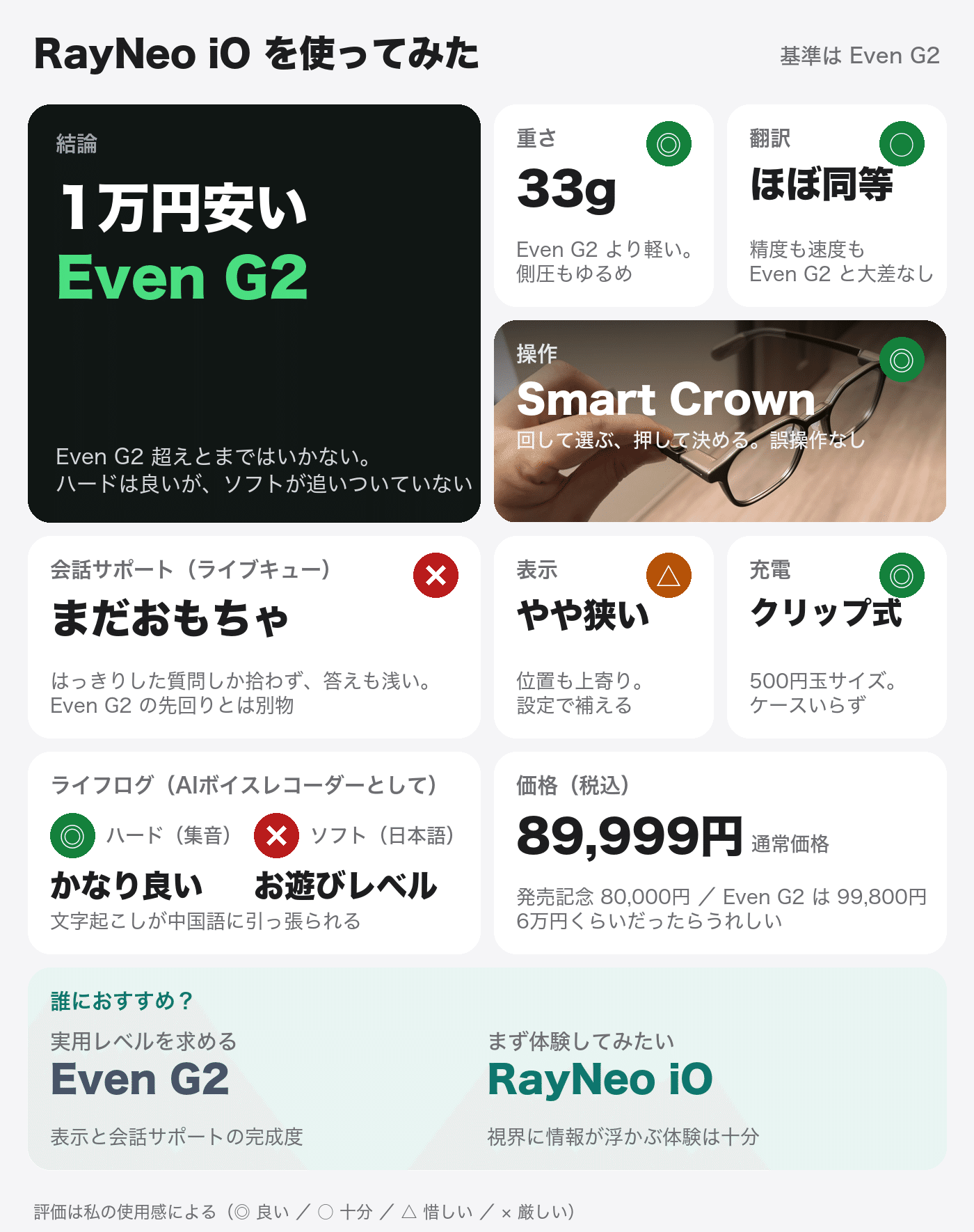
The good points of RayNeo iO:
-
The reliable operation feel of Smart Crown
-
Its lightness and moderate side pressure
-
The compact clip-type charging
-
You can adjust the angle of the Head-Up display, as well as the font size and number of lines of subtitles, with detailed settings
-
You can edit the dashboard and send it to the left or right with Smart Crown
-
The height of the sound collection (the hardware foundation for lifelogs)
The disappointing part:
-
The display is a bit narrow and the position is shifted upwards (compared to the standard Even G2)
-
You cannot view the history of notifications
-
The conversation support (Live Cue) only picks up clear questions and the answers are also shallow, and no history is kept
-
The text transcription of lifelogs is pulled towards Chinese, and the accuracy of the summary is also low
-
The UI has residual Chinese characters, and the localization is rough
-
Tasks cannot be linked with external ToDo apps (this is the same for Even G2)
-
The concept is somewhat ambiguous, being neither cheap nor high-end
If you only look at the basic functions of smart glasses, such as notifications, displays, and operations, there is not a huge difference between Even G2 and this. I didn't have a moment where I felt like this was on a different level. The difference lies in the conversation support and the completeness of the apps. I think RayNeo iO is still a transitional product. If you're looking for smart glasses at a practical level, then Even G2 is the way to go, but if you want to try it out, RayNeo iO is also fine. That's my conclusion.
After using it, the RayNeo iO felt like a hybrid of the Even G2, a pioneer of practical smart glasses, and an AI voice-recorder pendant. If I were buying smart glasses, I would choose the Even G2. Viewed as an extension of an AI pendant, its hardware is well made. If the software catches up, it could become something special. Your assessment will depend heavily on which role you want it to fill.
What I hope to see in the next model is a more straightforward connection between these two aspects. Even when folded and hung around the neck, it should continue to record as a pendant. If that's possible, I think the RayNeo iO can break away from the impression of being an 'Even G2 for 10,000 yen less' and become a product that can do what neither the Even G2 nor the AI pendant can.
The fact that a product with the same philosophy as the Even G2 has been released is, simply put, a welcome development. If there are more players on the competitive side, both will improve through competition. If a RayNeo for around 60,000 yen were to be released, I think I would buy it again at that time.
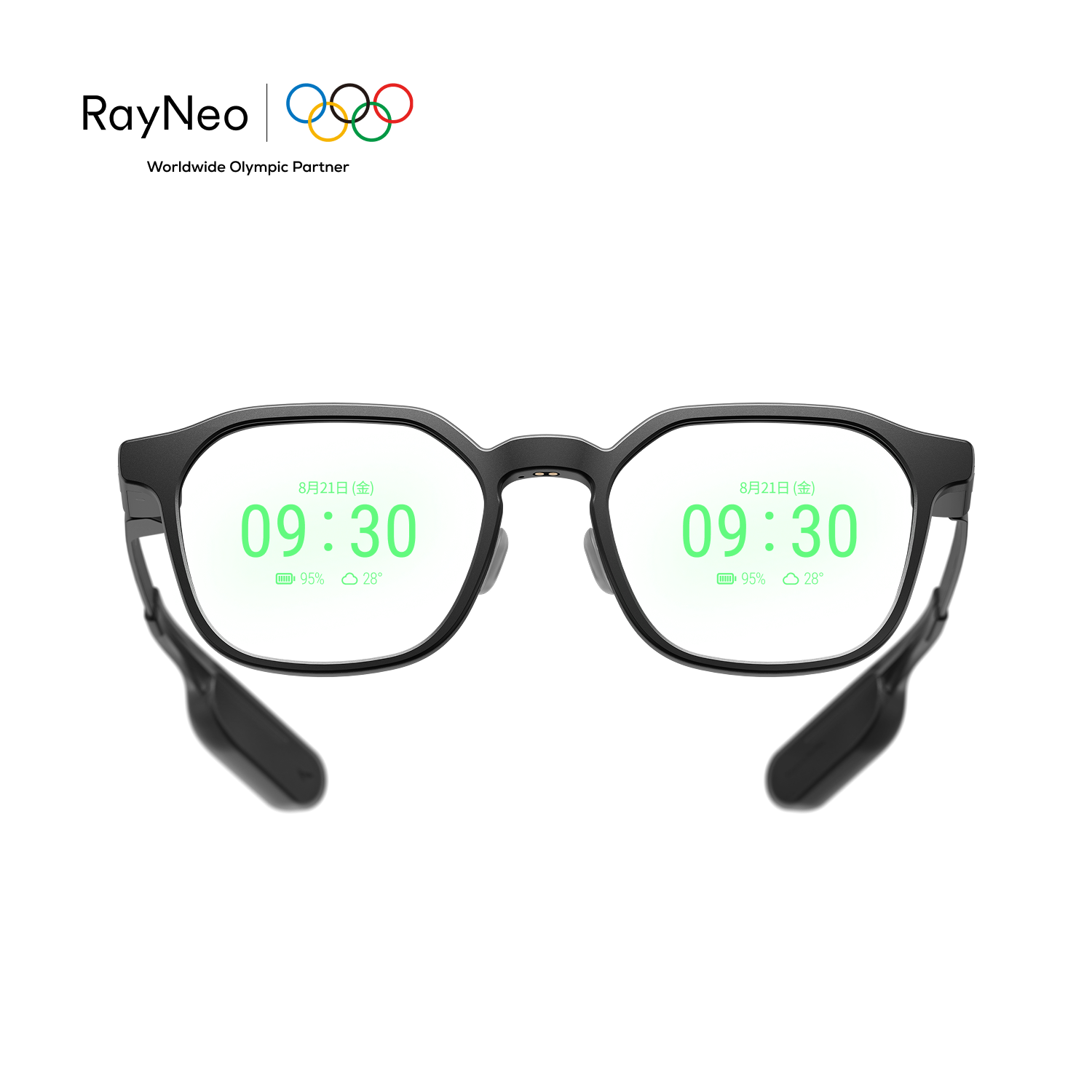 RayNeo iO
 Even G2